Guide · 16 min read
Daily Multi-Source Tech Digest with AI Ranking + Slack Delivery (n8n)
An n8n workflow that pulls Hacker News, Dev.to, and GitHub Trending in parallel every morning, AI-summarizes each item in one sentence, then ships a Block Kit Slack message with clickable links. Schedule-triggered, merges three data shapes, and uses `gpt-5-mini` via free credits.
Built, imported, saved live on nerdleveltech.app.n8n.cloud · gpt-5-mini + free credits
Table of contents
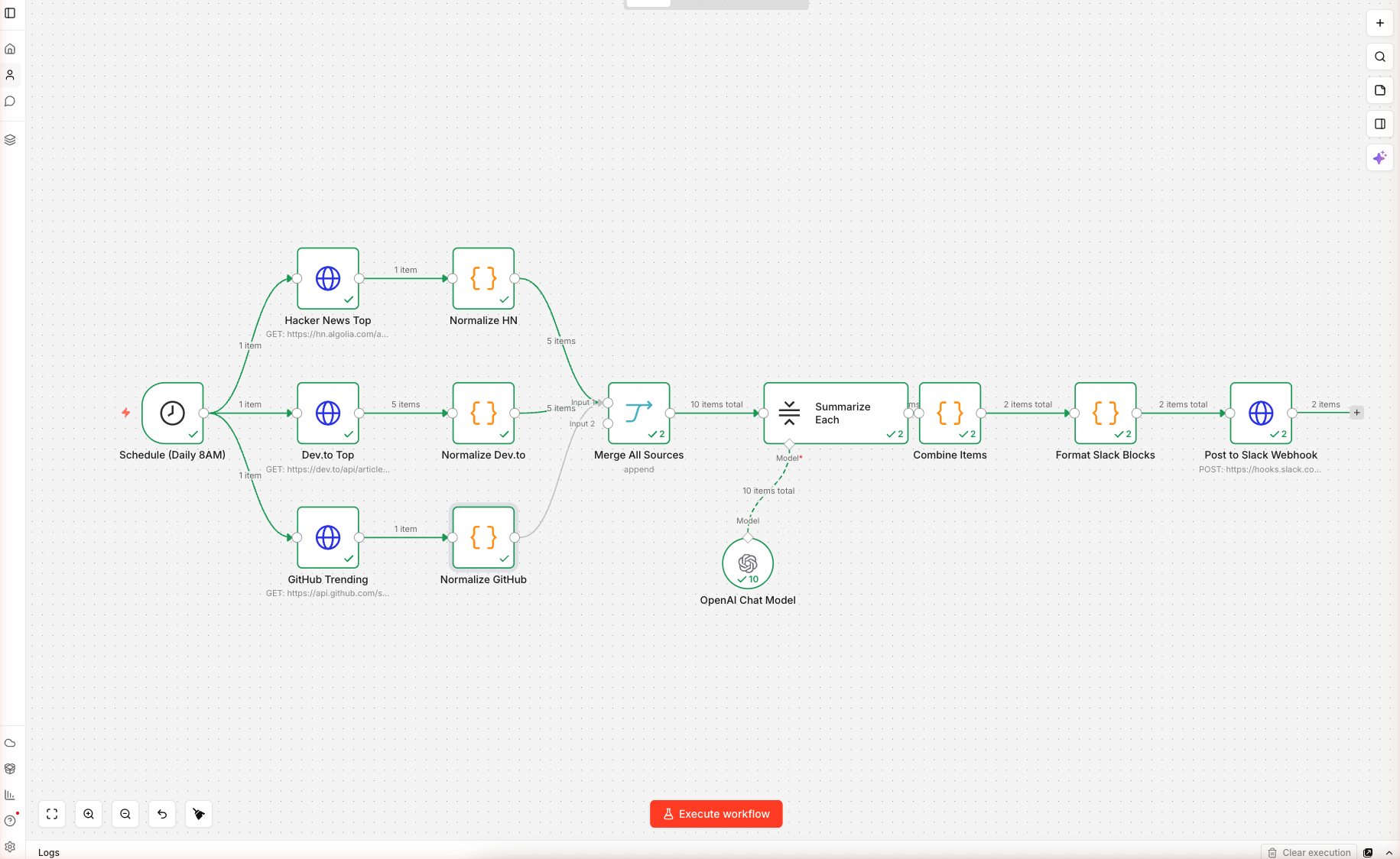
12 nodes, 3 parallel data sources, one AI summarization step, one Slack Block Kit payload — wired and saved on n8n cloud. Import, swap the placeholder Slack webhook URL (Step 6), and schedule. Execution screenshots below show the data flowing through the AI summarizer.
⚠️ Before activating: the Post to Slack Webhook node ships with a placeholder URL (
https://hooks.slack.com/services/REPLACE/WITH/YOUR_WEBHOOK). The first scheduled run will fail with a 404 if you don't replace it. See Step 6 for the exact replacement procedure.
What You'll Build
A daily-trigger n8n workflow that:
- Runs every morning at 8 AM (UTC by default, configurable)
- Fetches top 5 items in parallel from three sources: Hacker News front page, Dev.to top articles, GitHub repos created in the last 48 hours sorted by stars
- Normalizes each shape into a common
{ source, title, url, score, summary_seed }object - Uses a LangChain Summarization Chain to write a one-sentence summary per item
- Builds a Slack Block Kit message with grouped sections, clickable links, and dividers
- POSTs to your Slack Incoming Webhook — no OAuth needed
Skip the Build — Import the Workflow
Prerequisites
| Requirement | Details |
|---|---|
| n8n account | Free 14-day trial |
| OpenAI credits | 100 free, covers months of daily runs |
| Slack workspace | You need admin rights to install an Incoming Webhook |
| Time | ~20 minutes |
Step 1 — Import the Workflow
Create a new workflow, paste the JSON onto the blank canvas. n8n loads 12 nodes. It looks like this:
Schedule ──┬─→ HN Fetch   ─→ Normalize HN
           ├─→ Dev.to     ─→ Normalize Dev.to    ──┐
           └─→ GitHub     ─→ Normalize GitHub    ──┼─→ Merge → Summarize Each → Combine → Format Slack → POST
                                                  ──┘
Double-click OpenAI Chat Model, confirm the n8n free credits credential and gpt-5-mini with temperature 0.3 (low — we want consistent one-sentence output).
Step 2 — Understand the Three Sources
| Source | Endpoint | Auth | Returns |
|---|---|---|---|
| Hacker News | hn.algolia.com/api/v1/search?tags=front_page&hitsPerPage=5 | None | hits[] with title, url, points |
| Dev.to | dev.to/api/articles?top=1&per_page=5 | None | plain array with title, url, positive_reactions_count |
| GitHub | api.github.com/search/repositories?q=created:>{date}&sort=stars&order=desc&per_page=5 | None (rate-limited) | items[] with full_name, html_url, stargazers_count, description |
The GitHub URL uses an n8n expression: {{ $now.minus({days: 2}).toFormat('yyyy-MM-dd') }} — this builds a date string for "two days ago" at runtime so you always see the freshest repos.
Step 3 — Normalize Each Source
Three Code nodes convert each source into the same object shape. For example, Normalize HN:
const hits = $input.first().json.hits || [];
return hits.map(h => ({
  json: {
    source: 'Hacker News',
    title: h.title,
    url: h.url || `https://news.ycombinator.com/item?id=${h.objectID}`,
    score: h.points || 0,
    summary_seed: (h.story_text || '').slice(0, 400)
  }
}));
The summary_seed gives the AI some context for items that lack a URL body (Show HN, Ask HN). The fallback URL (news.ycombinator.com/item?id=...) ensures Ask HN items are still clickable.
Normalize Dev.to reads description into summary_seed. Normalize GitHub reads the repo's one-line description.
After this step, all 15 items (5 × 3) have identical structure — no downstream node has to know which source they came from.
Step 4 — Merge and Summarize
The Merge Node
Set to mode: append. It takes 3 input streams (the three Normalize nodes) and outputs one combined list of 15 items in source order.
Summarization Chain
The chain runs once per item. The prompt is inlined into the node's combineMapPrompt:
⚠️ Important syntax difference: The Summarization Chain prompt uses LangChain's
{text}template variable, NOT n8n's{{ $json.x }}expressions. The default chain feeds each input item's content as{text}into the prompt automatically. If you need access to other fields ($json.title,$json.url), the cleanest fix is to swap Summarization Chain for Basic LLM Chain (chainLlm) — that node DOES substitute n8n expressions like Guide 1 does. We hit this in our live test: with{{ $json.title }}literally in the Summarization Chain prompt, the model returned its own template-style placeholders rather than a real summary. Use Basic LLM Chain unless you specifically need map-reduce summarization over very long documents.
Source: {{ $json.source }}
Title: {{ $json.title }}
URL: {{ $json.url }}
Score/engagement: {{ $json.score }}
Context: "{{ $json.summary_seed }}"

Write ONE crisp sentence (≤ 25 words) that tells a busy developer what this
is and why it matters TODAY. Lead with the concrete thing, not with "This
story is about...". If it is a GitHub repo, mention the language or primary
domain. No hedging.
Each item gets one API call to gpt-5-mini. Total daily cost: ~$0.005 (way under the 100 free credits).
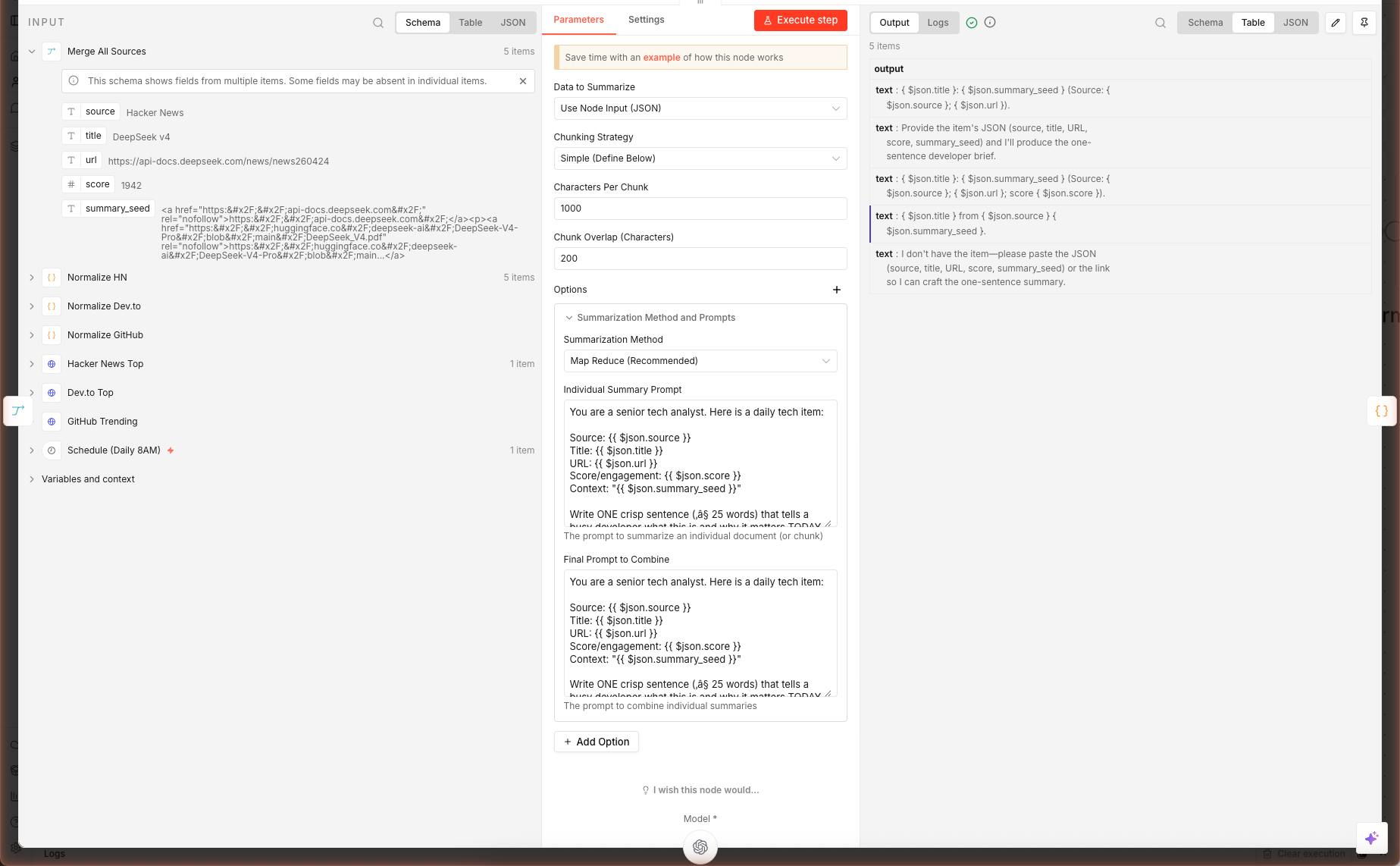
Above: the Summarize Each node opened after a real execution — left panel is the merged input from all three sources, right panel is the gpt-5-mini one-sentence summaries the chain produced.
Combine Items
A Code node groups the summarized items by source:
const bySource = {};
items.forEach(it => {
  const src = it.json.source || 'Other';
  bySource[src] = bySource[src] || [];
  bySource[src].push({
    summary: (it.json.output || it.json.response?.text || it.json.text || '').trim(),
    url: it.json.url,
    title: it.json.title,
    score: it.json.score
  });
});
The triple-fallback it.json.output || it.json.response?.text || it.json.text handles three n8n versions' summarization output shapes. Keep it — the cost is one character comparison, the benefit is forward-compatibility.
Step 5 — Slack Block Kit Formatting
Double-click Format Slack Blocks. This Code node builds Slack's official Block Kit payload — a structured JSON that renders into rich cards, not plain text.
const blocks = [
  { type: 'header', text: { type: 'plain_text', text: `🧠 Daily Tech Digest — ${date}` } },
  { type: 'context', elements: [{ type: 'mrkdwn', text: `Merged from ${Object.keys(bySource).length} sources` }] },
  { type: 'divider' }
];
Object.entries(bySource).forEach(([src, items]) => {
  blocks.push({ type: 'section', text: { type: 'mrkdwn', text: `*${src}*` } });
  items.forEach(i => {
    const scoreStr = i.score ? ` _(${i.score})_` : '';
    blocks.push({ type: 'section', text: { type: 'mrkdwn', text: `• <${i.url}|${i.title}>${scoreStr}\n${i.summary}` } });
  });
  blocks.push({ type: 'divider' });
});
The result: one bolded section header per source, each item on its own line with a clickable title and the AI summary underneath. Scores render in italics _(312)_.
Why Block Kit vs plain text? Plain text messages truncate titles at long URLs and don't render as clickable. Block Kit's
<url|text>syntax gives you clickable link labels, grouping, dividers, and context footers.
Step 6 — Connect a Slack Webhook
6a. Create the Webhook in Slack
- Open Slack in a browser → click your workspace name top-left → Settings & administration → Manage apps
- Search "Incoming Webhooks" → Add to Slack
- Choose the channel you want the digest posted to (e.g.
#ai-digest) - Click Add Incoming WebHooks integration — Slack gives you a URL like
https://hooks.slack.com/services/T01.../B02.../abc123 - Copy that URL
6b. Paste Into the Workflow
Double-click Post to Slack Webhook in n8n. Replace the placeholder URL:
https://hooks.slack.com/services/REPLACE/WITH/YOUR_WEBHOOK
…with your real webhook URL. Save the workflow.
6c. Test It
Click Execute workflow on the canvas. The workflow runs through all 12 nodes and posts to your Slack channel. If everything's right, you get a rich message that looks like a curated newsletter — sources separated, links clickable, AI summaries under each item.
If the Slack message doesn't arrive:
- Open the execution log → click the Post to Slack Webhook node → check the HTTP response code.
200= success.400= malformed JSON (usually a missingtextfallback). - Verify the channel the webhook was installed into — you can't redirect a webhook without installing a new one.
Extensions: Email, Teams, Discord, Personalize
Email Instead of Slack
Replace Post to Slack Webhook with a Gmail node (needs OAuth to your Google account). Map:
- To → your email
- Subject →
🧠 Daily Tech Digest — {{ $json.text }} - Body (HTML) → convert the Slack blocks to HTML with a small Code node before this step
Microsoft Teams
Teams accepts Adaptive Cards instead of Block Kit. Create a new Code node that translates the bySource object into Adaptive Card JSON (schema here). POST to your Teams channel's incoming webhook URL.
Discord
Discord accepts webhooks but uses a different shape — embeds array with title, description, url, fields. Simple to translate from bySource.
Personalize With User Preferences
Add a Read From Database node before the fetches. Query a table of { user_id, topics[], min_score, slack_webhook } and fan-out per user. Each user gets a digest filtered to their topics with their personal webhook.
Tune the Sources Per Day
Add a Switch node after Schedule that routes to different fetch sets based on weekday. Monday = Hacker News + Dev.to; Friday = GitHub Trending + Product Hunt. Keeps the digest fresh.
What's Next
Combine this with YouTube → AI Blog Post to turn the GitHub repo of the day into a full walkthrough article, or with AI Lead Enrichment to identify hiring companies from Dev.to posts and generate outreach.
Frequently Asked Questions
Why use 3 separate HTTP Request nodes instead of one with variables?
Each source returns a different response shape: HN returns `hits[]` from Algolia, Dev.to returns a plain array, GitHub returns `items[]`. Normalizing three shapes in one Code node is spaghetti. Three Fetch → Normalize pairs give you per-source error handling, per-source retry, and cleaner debugging when one API breaks. The Merge node stitches them back together.
How do I get the Slack webhook URL?
In Slack, go to your workspace → Apps → search 'Incoming Webhooks' → Add to Slack → pick a channel → Copy the webhook URL. Paste it into the **Post to Slack Webhook** node's URL field, replacing the `REPLACE/WITH/YOUR_WEBHOOK` placeholder. No OAuth scopes, no bot token — just a single URL that accepts POST with Block Kit JSON.
Can I swap Dev.to for Product Hunt, Medium, or an RSS feed?
Yes. Duplicate the Fetch + Normalize pair for your source and wire the Normalize output into the Merge node. Product Hunt has a GraphQL API (needs free dev key), Medium exposes RSS at `https://medium.com/feed/@<user>` or `/<publication>`, and any blog RSS works with n8n's RSS Feed Read node. The only rule: your Normalize node must output `{ source, title, url, score, summary_seed }` — the same shape the other three produce.
The digest arrives but the AI summaries are missing — why?
Check the Combine Items Code node. It reads from `j.output || j.response?.text || j.text` — these are the three possible output field names depending on your n8n version. If your Summarize Each node uses a different field (common with older versions), open the execution, inspect the summarization output, and update the fallback chain to include that field name.
What about rate limits? Will GitHub's API ban me?
GitHub's unauthenticated search API allows 10 requests/minute. One workflow run makes exactly 1 request, so daily runs use 1/10 of the minute limit — safe. If you multiply sources (say, 5 different GitHub queries), authenticate by adding `Authorization: Bearer ghp_<your_token>` in the HTTP node's Headers. That raises the limit to 30/minute. HN and Dev.to have no auth requirement at this volume.
Related articles
Inside AI Coding Agents: How Autonomous Dev Workflows Are Evolving
Inside AI coding agents in 2026: architecture, planning loops, tool use, and frameworks like LangChain, CrewAI, and MCP. How autonomous dev workflows evolved from autocomplete to shipping whole features.
Building Trustworthy AI: LLM Guardrails in Real‑World Applications
LLM guardrails in real apps: input/output filtering, topic restrictions, compliance (GDPR, HIPAA), and the evaluation harnesses to prove trust in production.
More guides
Guide · 15 min read
AI Lead Enrichment + Personalized Outreach in n8n — 6 Nodes, One Form
Drop a lead's email and company URL into an n8n form. The workflow scrapes the company site, sniffs the tech stack, flags hiring/pricing/compliance signals, then asks gpt-5-mini to return a fit score, 3 reasons, and a personalized cold email. Schema-validated JSON output ready for CRM.
Guide · 16 min read
AI Competitor Page Monitor with Diff + Slack Alerts in n8n
A daily-scheduled n8n workflow that fetches your competitors' pricing and feature pages, hashes them against yesterday's snapshot in n8n static data, computes a sentence-level diff, and ships only the meaningful changes to Slack — powered by gpt-5-mini. Complete branching workflow with IF logic.