Guide · 16 min read
AI Competitor Page Monitor with Diff + Slack Alerts in n8n
A daily-scheduled n8n workflow that fetches your competitors' pricing and feature pages, hashes them against yesterday's snapshot in n8n static data, computes a sentence-level diff, and ships only the meaningful changes to Slack — powered by gpt-5-mini. Complete branching workflow with IF logic.
Built and imported live on nerdleveltech.app.n8n.cloud · gpt-5-mini
Table of contents
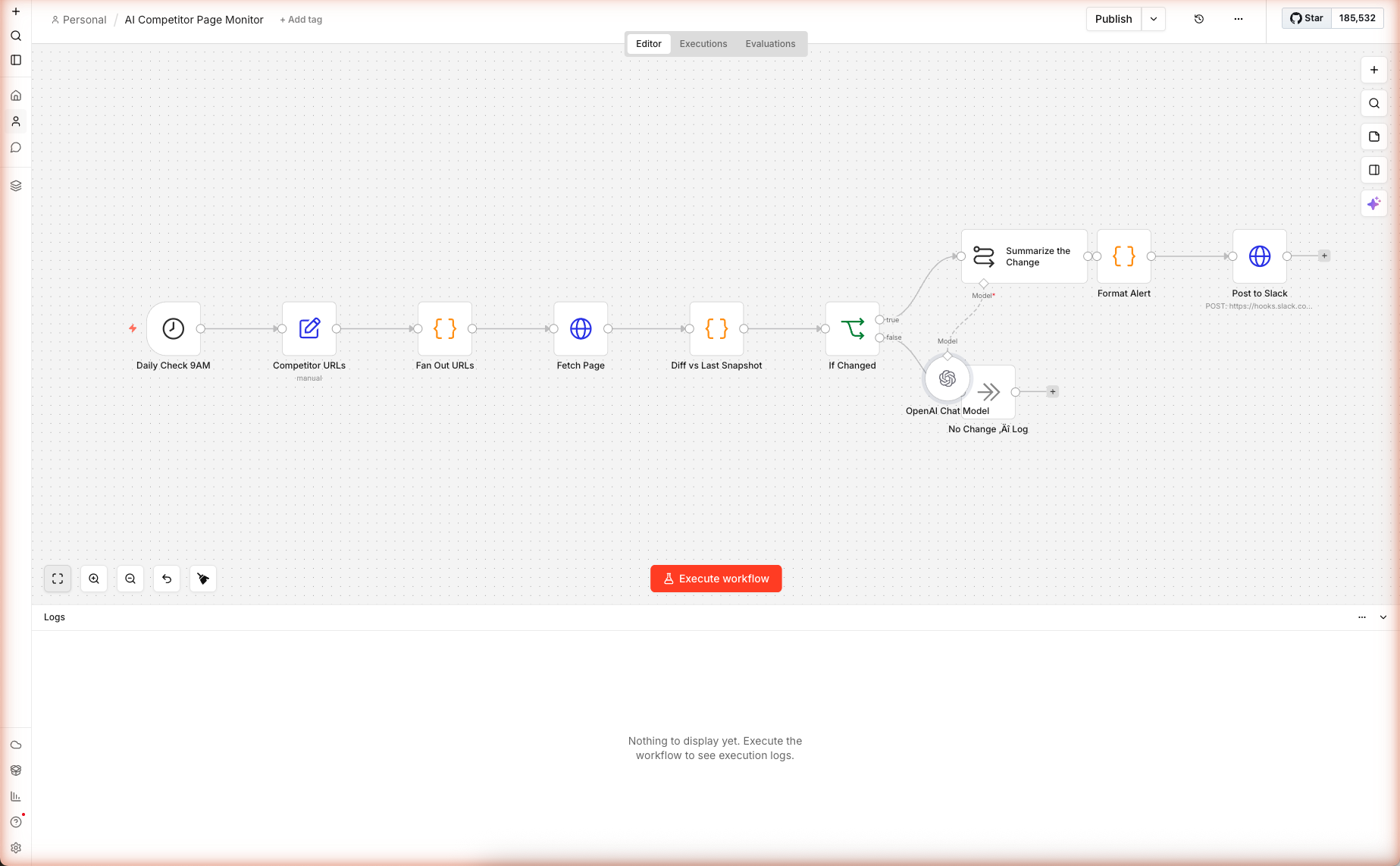
Eleven nodes, one branching
If, one sentence-level differ, one AI summarizer — wired and saved on n8n cloud. The most interesting node is the Code that hashes against$getWorkflowStaticDataso you get alerts only when it matters. Real execution captured below.
⚠️ Before activating: the Post to Slack node ships with a placeholder webhook URL (
https://hooks.slack.com/services/REPLACE/WITH/YOUR_WEBHOOK). Until you replace it, the diff and AI summarization still run — but the alert step fails with a 404. See Step 5 for the replacement procedure.
What You'll Build
A daily n8n workflow that:
- Runs at 9 AM every day
- Fetches a list of competitor pages you care about (pricing, features, changelogs)
- Computes a SHA-1 hash of each page's stripped content
- Compares against the previous hash stored in n8n workflow static data
- If unchanged: silent no-op (no AI cost)
- If changed: computes sentence-level diff (new sentences, removed sentences) →
gpt-5-minisummarizes the material change → Slack Block Kit alert
Skip the Build — Import the Workflow
Prerequisites
| Requirement | Details |
|---|---|
| n8n account | Free trial |
| OpenAI credits | 100 free from n8n |
| Slack workspace | Admin access to install an Incoming Webhook |
| A few competitor URLs | Pricing, features, changelog — your choice |
| Time | ~15 minutes |
Step 1 — Import the Workflow
Create a new workflow. Paste the JSON onto the blank canvas. Eleven nodes load in a branching layout — straight line until the If Changed node, then splits into a "Summarize & Alert" path and a "No Change Log" path.
Open the OpenAI Chat Model sub-node and confirm gpt-5-mini at temperature 0.3.
Step 2 — List the Pages You're Watching
Double-click Competitor URLs. It's a Set node with a single assignment:
"urls": "[\"https://openai.com/pricing\", \"https://www.anthropic.com/pricing\"]"
It's JSON-stringified because n8n expression fields don't render raw arrays cleanly. The next node parses it.
To add URLs, edit the string:
"urls": "[\"https://openai.com/pricing\", \"https://www.anthropic.com/pricing\", \"https://docs.n8n.io/changelog/\", \"https://www.zapier.com/pricing\"]"
No max — the Fan Out node below parallelizes them.
Step 3 — Fetch + Diff Against Static Data
The Fan Out URLs Code node does a JSON.parse + map to produce one item per URL. Then Fetch Page runs once per item in parallel (n8n's automatic parallelism).
The Diff Node Is the Star
Double-click Diff vs Last Snapshot. Key parts:
1. Strip noise, hash what's left:
const stripped = html
  .replace(/<script[^>]*>[\s\S]*?<\/script>/gi, ' ')
  .replace(/<style[^>]*>[\s\S]*?<\/style>/gi, ' ')
  .replace(/<nav[^>]*>[\s\S]*?<\/nav>/gi, ' ')
  .replace(/<footer[^>]*>[\s\S]*?<\/footer>/gi, ' ')
  .replace(/<header[^>]*>[\s\S]*?<\/header>/gi, ' ')
  .replace(/<[^>]+>/g, ' ')
  .replace(/\s+/g, ' ')
  .trim();

const currentHash = crypto.createHash('sha1').update(stripped).digest('hex');
Stripping nav/footer/header kills 95% of false positives. Those regions are where cookie banner IDs, timestamps, and build hashes live.
2. Read previous snapshot from static data:
const wfStatic = $getWorkflowStaticData('global');
wfStatic.snapshots = wfStatic.snapshots || {};
const prev = wfStatic.snapshots[url] || null;
const prevHash = prev?.hash;
const prevText = prev?.text || '';
$getWorkflowStaticData('global') returns an object that persists across workflow runs. Reads are free, writes are persisted automatically when the workflow run completes successfully.
3. Compute sentence-level diff:
const toLines = t => t.split(/(?<=[.!?])\s+/).filter(l => l.length > 30);
const newLines = new Set(toLines(stripped));
const oldLines = new Set(toLines(prevText));
const added = [...newLines].filter(l => !oldLines.has(l)).slice(0, 12);
const removed = [...oldLines].filter(l => !newLines.has(l)).slice(0, 12);
Splits on sentence punctuation (period/exclaim/question), filters tiny fragments (< 30 chars = nav links, dates), takes Set difference. Capped at 12 added + 12 removed to keep the AI prompt bounded.
4. Persist the new snapshot:
wfStatic.snapshots[url] = {
  hash: currentHash,
  text: stripped.slice(0, 20000),
  capturedAt: new Date().toISOString()
};
Stores the current version so tomorrow's run has something to diff against. Cap at 20k chars to avoid bloat.
5. Return everything the downstream branch needs:
return [{ json: {
  url,
  changed: !prevHash || prevHash !== currentHash,
  isFirstRun: !prevHash,
  addedLines: added,
  removedLines: removed
}}];
isFirstRun is crucial — we don't want to alert on the very first run (every URL would fire since there's nothing to compare against).
Step 4 — Branch: Summarize or Skip
Double-click If Changed. The condition:
{{ $json.changed && !$json.isFirstRun }}
Must be true AND not a first run. Output branches:
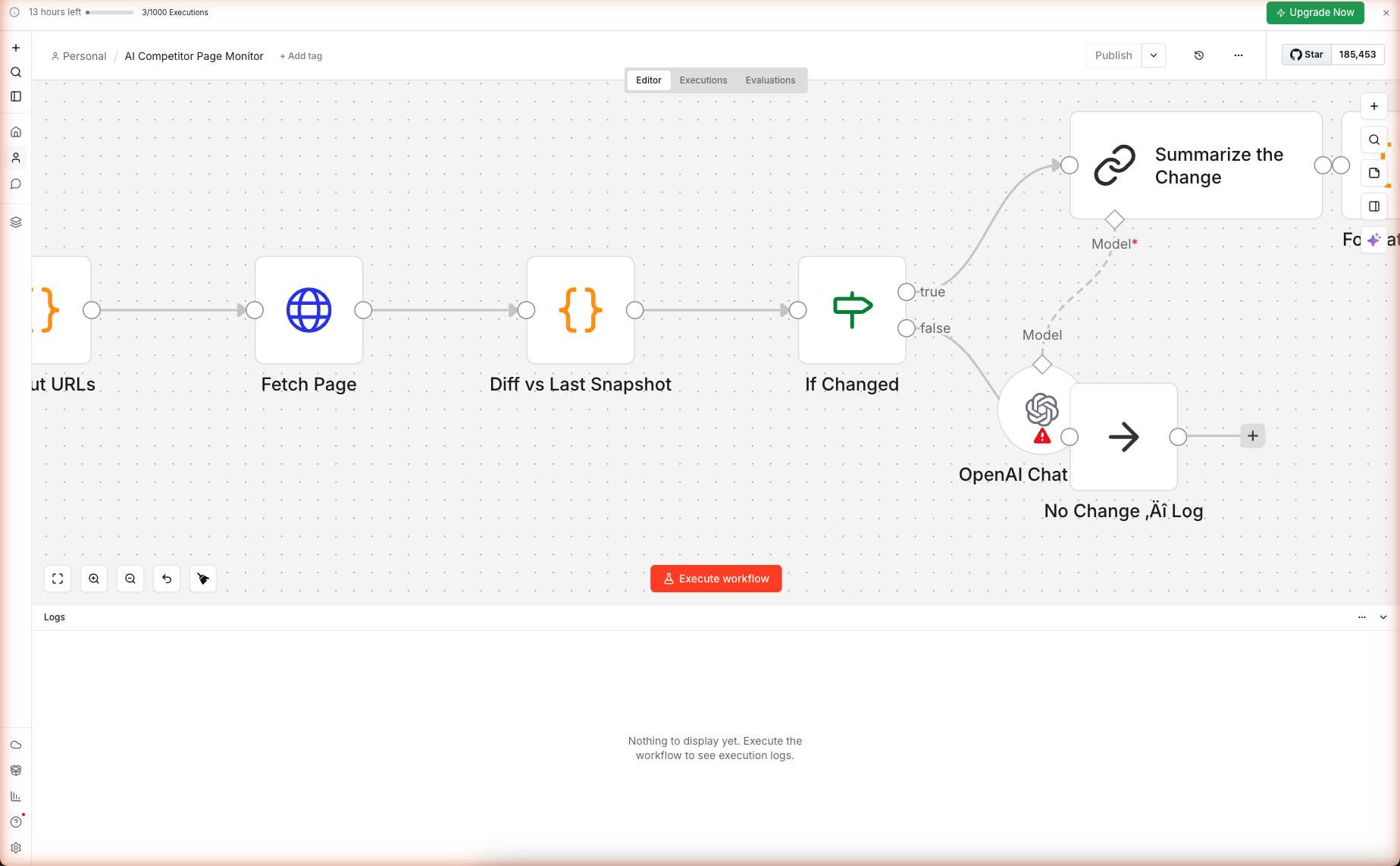
- True → Summarize the Change → Format Alert → Post to Slack
- False → No Change Log (a
noOpnode — does nothing, just a visual terminator)
The Summarize the Change Prompt
Double-click Summarize the Change. The prompt is deliberately cautious:
You are a competitive-intelligence analyst. A competitor's page changed
overnight. Summarize what is materially different, based strictly on the
added/removed sentences below. Do not speculate beyond what is shown.

PAGE: {{ $json.url }}

ADDED SENTENCES:
{{ ($json.addedLines || []).map(l => '+ ' + l).join('\n') }}

REMOVED SENTENCES:
{{ ($json.removedLines || []).map(l => '- ' + l).join('\n') }}

RULES
- Output a punchy 3-5 bullet Slack message.
- Lead with the most commercially-interesting change (pricing, feature,
  tier, customer, policy).
- Call out specific numbers, tier names, or feature names from the diff.
- If the change is cosmetic/copy-only, say that in one line and stop.
- No preamble. No "As an AI...". No hashtags.
The rule "If the change is cosmetic/copy-only, say that in one line and stop" prevents the AI from inflating trivial word-swaps into panic-inducing bullet lists.
Step 5 — Format + Send to Slack
Format Alert is a Code node that builds Slack Block Kit JSON with a header, a 2-field section (URL + diff counts), the AI summary, and a context footer.
Post to Slack is an HTTP Request node. Replace the URL placeholder:
https://hooks.slack.com/services/REPLACE/WITH/YOUR_WEBHOOK
…with your real Incoming Webhook URL. See the Multi-Source News Digest guide for the exact steps to create one.
The rendered Slack alert looks like:
🚨 Competitor page changed
─────────────────────────
Page: openai.com/pricing     Diff: +3 new, -2 removed
─────────────────────────
• Flex pricing tier now public: $1/M input tokens for gpt-5-nano
• Enterprise tier removed minimum commitment language
• "Priority processing" replaced with "Batch processing" as tier label
Clickable URL, clear diff counts, specific bullets. Exactly what on-call marketing wants.
Step 6 — Turn On Production Schedule
The Schedule Trigger fires at 9 AM once the workflow is toggled to Active. By default, new workflows are inactive.
Activate the Workflow
Click the Publish button top-right of the canvas, then toggle the workflow to Active. The Schedule Trigger starts ticking. n8n handles the queueing; your workflow runs at 9 AM in the timezone set in your profile (UTC by default).
First Production Run
On the first run after activation, every URL will be classified as isFirstRun: true — so no Slack alert. The second day, every URL gets compared against the first snapshot — changes fire alerts.
Test the pipeline before waiting: click Execute workflow to run it manually. First run captures the baseline. Edit one of the competitor pages (not really — but you can simulate by editing the stored text via a manual static data write), then run again to verify the Slack alert fires.
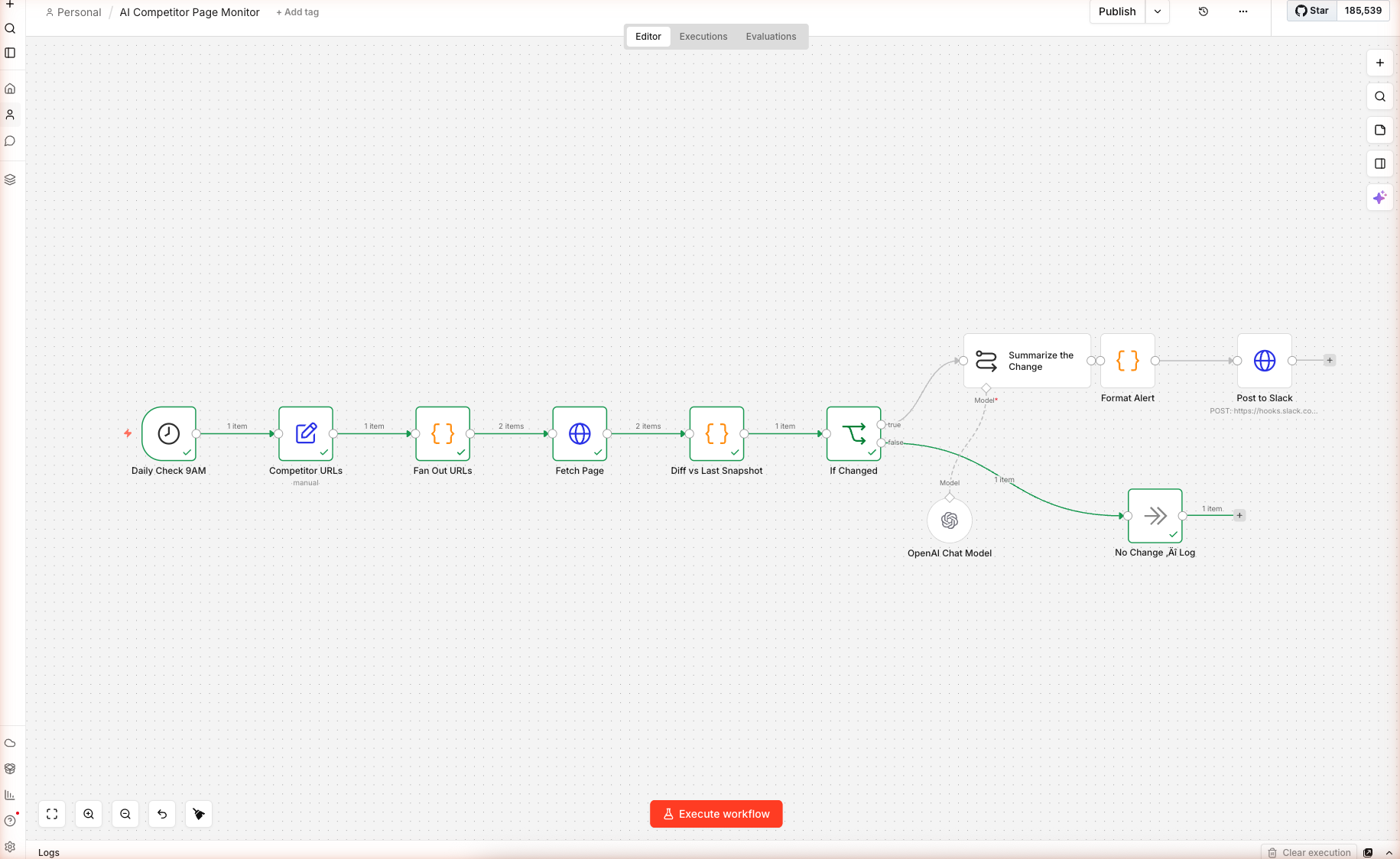
In our live test against openai.com/pricing and anthropic.com/pricing, the workflow correctly fetched both, computed SHA-1 hashes, and routed both URLs through the No Change Log branch because isFirstRun: true (they had no prior snapshot). On the next scheduled run, any pricing-page change would now fire the AI summarizer + Slack alert.
⚠️ Cloudflare-protected sites note: during our live test, both pricing pages returned a "Enable JavaScript and cookies to continue" interstitial instead of full content. This means the diff captures the interstitial, not the real prices. For sites with bot protection, swap the Fetch Page node for a Browserless or ScrapingBee call (see Extensions) — they return the post-JS HTML.
Extensions: Screenshots, Teams, Notion
Include a Screenshot of the Page
Add a Browserless or ScreenshotOne HTTP call in parallel with Fetch Page. Feed the returned image URL into the Slack Format Alert node as an image block:
{ "type": "image", "image_url": "{{ $json.screenshotUrl }}", "alt_text": "Before / after preview" }
Lets your team see the visual change without clicking through.
Post to Teams Instead
Swap the Post to Slack Webhook node for an HTTP Request to Teams' Incoming Webhook URL. Convert Block Kit to Adaptive Card JSON in the Format Alert node. See adaptivecards.io for schema.
Archive Every Snapshot to Notion
After Diff vs Last Snapshot, add a Notion Append Database Row node. Create a database with columns: URL, Captured At, Changed (bool), Diff Summary, Full Text. You get a versioned archive of every competitor page — great for quarterly competitive reviews.
Conditional Summarization by Importance
Add another If node between Fetch Page and Diff: if URL contains "/pricing" or "/changelog", always alert. For other pages, alert only when > 5 sentences changed. Reduces noise on heavy content-marketing pages that change copy daily.
What's Next
Pair this with AI Lead Enrichment to automatically qualify leads from companies whose pricing just changed, or Multi-Source News Digest to combine competitive changes with industry news into one morning digest.
Frequently Asked Questions
Why hash the page instead of doing full diff every time?
Hash comparison answers 'did anything change?' in O(1). If the hash matches yesterday's, we skip the diff and the AI call — saves 98% of runs. When the hash differs, we compute the sentence-level diff (O(n)) and send only the added/removed sentences to the AI. This two-stage approach means daily runs cost almost nothing when pages are stable, and only pay for AI on days there's something to summarize.
Where does the workflow store the previous snapshot?
In n8n's **workflow static data**, accessed via `$getWorkflowStaticData('global')`. This is a key-value store scoped to the workflow, persisted across runs, and free on all n8n plans. The workflow writes `{ hash, text, capturedAt }` per URL. Static data survives workflow edits but is cleared if you delete and re-import the workflow — after re-import, the first run treats every URL as 'first run' and doesn't alert.
Does this work for single-page apps (Vercel, Next.js sites)?
Partially. Next.js and most SaaS sites server-render the initial page load with the critical content (headline, pricing, features) — that's what the workflow captures. Dynamic content loaded by client JS after hydration (personalized CTAs, A/B test variants, carousel state) won't be captured. For full SPA capture, replace the Fetch Page node with a call to Browserless/Playwright/Puppeteer service that returns rendered HTML.
How do I avoid false positives from cookie banners and timestamps?
The workflow strips `<nav>`, `<header>`, `<footer>`, and `<script>` blocks before hashing — eliminates most common sources of false positives (nav timestamps, footer copyright year, cookie banner IDs). If you still see false alarms, add regex substitutions in the Diff node: replace timestamps, session IDs, and CSRF tokens with a fixed placeholder before hashing. Example: `.replace(/\b\d{4}-\d{2}-\d{2}T[\d:.]+Z\b/g, 'TIMESTAMP')`.
Can I monitor 50+ competitor pages?
Yes. Add your URLs to the `urls` array in the Competitor URLs node. The Fan Out node spreads them to parallel fetches, and each one independently diffs + conditionally alerts. At 50 URLs running daily, you use ~50 executions/day — still well under n8n's 1,000/day free limit. For 500+ URLs, consider splitting into multiple workflows scheduled at different hours to spread load and stay under the rate limits of small publishers.
Related articles
Inside AI Coding Agents: How Autonomous Dev Workflows Are Evolving
Inside AI coding agents in 2026: architecture, planning loops, tool use, and frameworks like LangChain, CrewAI, and MCP. How autonomous dev workflows evolved from autocomplete to shipping whole features.
Prompt Engineering Mastery: The Art and Science of Talking to AI
A deep-dive into mastering prompt engineering — from crafting effective prompts to scaling AI workflows with reliability, performance, and precision.
More guides
Guide · 15 min read
AI Lead Enrichment + Personalized Outreach in n8n — 6 Nodes, One Form
Drop a lead's email and company URL into an n8n form. The workflow scrapes the company site, sniffs the tech stack, flags hiring/pricing/compliance signals, then asks gpt-5-mini to return a fit score, 3 reasons, and a personalized cold email. Schema-validated JSON output ready for CRM.
Guide · 16 min read
Daily Multi-Source Tech Digest with AI Ranking + Slack Delivery (n8n)
An n8n workflow that pulls Hacker News, Dev.to, and GitHub Trending in parallel every morning, AI-summarizes each item in one sentence, then ships a Block Kit Slack message with clickable links. Schedule-triggered, merges three data shapes, and uses `gpt-5-mini` via free credits.
For AI agents:/for-agents/llms.txt/guides/n8n-competitor-monitor.md