---
title: Daily Multi-Source Tech Digest with AI Ranking + Slack Delivery (n8n)
description: An n8n workflow that pulls Hacker News, Dev.to, and GitHub Trending in parallel every morning, AI-summarizes each item in one sentence, then ships a Block Kit Slack message with clickable links. Schedule-triggered, merges three data shapes, and uses `gpt-5-mini` via free credits.
url: https://nerdleveltech.com/guides/n8n-multisource-news-digest
language: en
last_updated: '2026-04-24'
category: tooling
reading_time_minutes: 16
author: NerdLevelTech
keywords:
- n8n news digest
- multi-source RSS automation
- AI news summarizer
- Hacker News n8n
- Dev.to API n8n
- GitHub trending automation
- Slack Block Kit n8n
- schedule trigger LLM
- daily digest AI
- merge node n8n
markdown_url: https://nerdleveltech.com/guides/n8n-multisource-news-digest.md
attribution: 'Source: NerdLevelTech — https://nerdleveltech.com/guides/n8n-multisource-news-digest'
terms: https://nerdleveltech.com/llms.txt
---
# Daily Multi-Source Tech Digest with AI Ranking + Slack Delivery (n8n)
*Last updated: 2026-04-24 | Built, imported, saved live on nerdleveltech.app.n8n.cloud | gpt-5-mini + free credits*
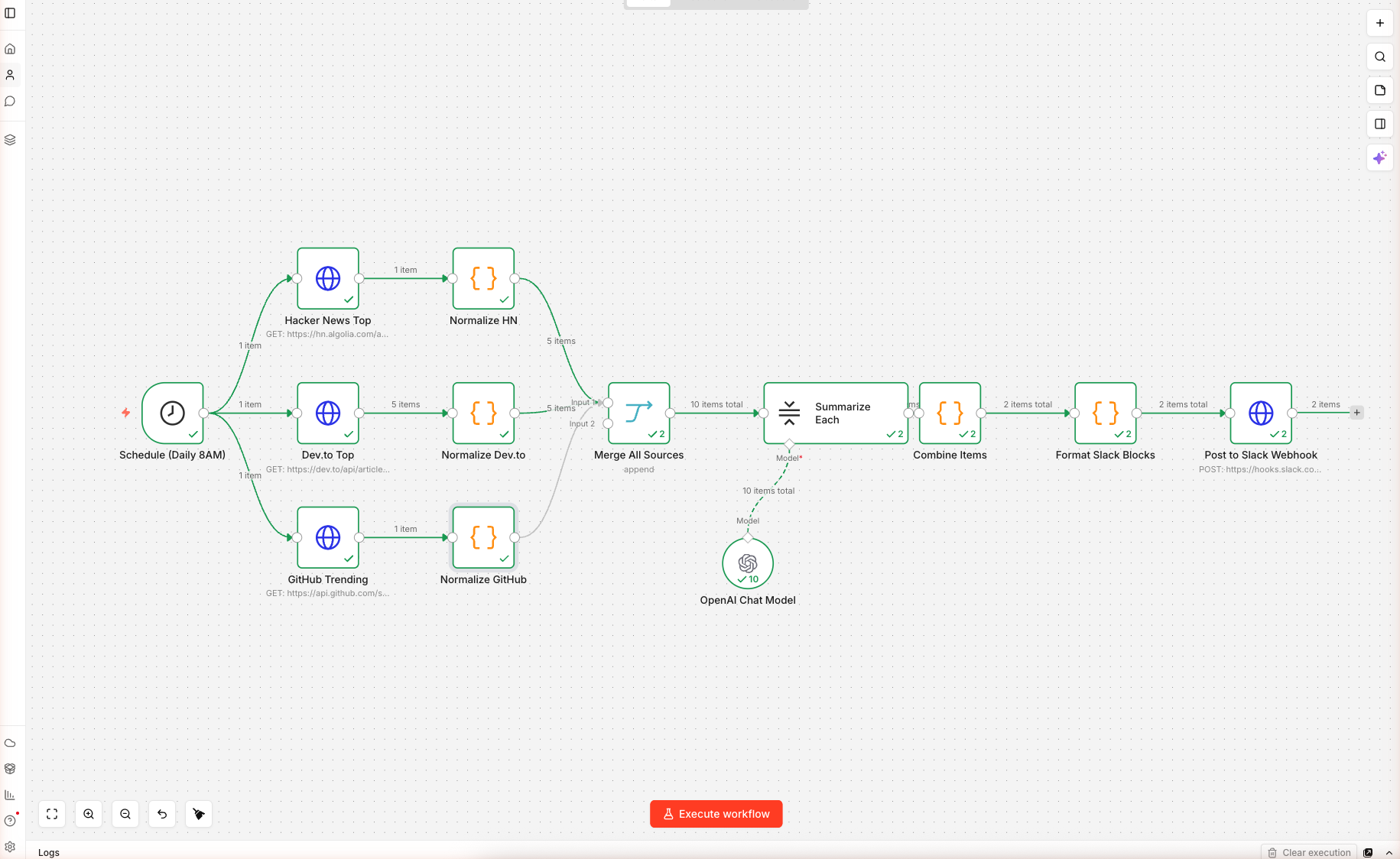
> **12 nodes, 3 parallel data sources, one AI summarization step, one Slack Block Kit payload — wired and saved on n8n cloud.** Import, **swap the placeholder Slack webhook URL** (Step 6), and schedule. Execution screenshots below show the data flowing through the AI summarizer.
> ⚠️ **Before activating: the Post to Slack Webhook node ships with a placeholder URL** (`https://hooks.slack.com/services/REPLACE/WITH/YOUR_WEBHOOK`). The first scheduled run will fail with a 404 if you don't replace it. See Step 6 for the exact replacement procedure.
## What You'll Build
A daily-trigger n8n workflow that:
- Runs **every morning at 8 AM** (UTC by default, configurable)
- Fetches **top 5 items in parallel** from three sources: Hacker News front page, Dev.to top articles, GitHub repos created in the last 48 hours sorted by stars
- **Normalizes** each shape into a common `{ source, title, url, score, summary_seed }` object
- Uses a **LangChain Summarization Chain** to write a one-sentence summary per item
- Builds a **Slack Block Kit message** with grouped sections, clickable links, and dividers
- POSTs to your **Slack Incoming Webhook** — no OAuth needed
 ### Skip the Build — Import the Workflow
---
## Prerequisites
| Requirement | Details |
|-------------|---------|
| n8n account | Free 14-day trial |
| OpenAI credits | 100 free, covers months of daily runs |
| Slack workspace | You need admin rights to install an Incoming Webhook |
| Time | ~20 minutes |
---
## Step 1 — Import the Workflow
Create a new workflow, paste the JSON onto the blank canvas. n8n loads 12 nodes. It looks like this:
```
Schedule ──┬─→ HN Fetch ─→ Normalize HN
├─→ Dev.to ─→ Normalize Dev.to ──┐
└─→ GitHub ─→ Normalize GitHub ──┼─→ Merge → Summarize Each → Combine → Format Slack → POST
──┘
```
Double-click **OpenAI Chat Model**, confirm the n8n free credits credential and `gpt-5-mini` with temperature `0.3` (low — we want consistent one-sentence output).
---
## Step 2 — Understand the Three Sources
| Source | Endpoint | Auth | Returns |
|--------|----------|------|---------|
| Hacker News | `hn.algolia.com/api/v1/search?tags=front_page&hitsPerPage=5` | None | `hits[]` with title, url, points |
| Dev.to | `dev.to/api/articles?top=1&per_page=5` | None | plain array with title, url, positive_reactions_count |
| GitHub | `api.github.com/search/repositories?q=created:>{date}&sort=stars&order=desc&per_page=5` | None (rate-limited) | `items[]` with full_name, html_url, stargazers_count, description |
The GitHub URL uses an n8n expression: `{{ $now.minus({days: 2}).toFormat('yyyy-MM-dd') }}` — this builds a date string for "two days ago" at runtime so you always see the freshest repos.
---
## Step 3 — Normalize Each Source
Three Code nodes convert each source into the same object shape. For example, **Normalize HN**:
```javascript
const hits = $input.first().json.hits || [];
return hits.map(h => ({
json: {
source: 'Hacker News',
title: h.title,
url: h.url || `https://news.ycombinator.com/item?id=${h.objectID}`,
score: h.points || 0,
summary_seed: (h.story_text || '').slice(0, 400)
}
}));
```
The `summary_seed` gives the AI some context for items that lack a URL body (Show HN, Ask HN). The fallback URL (`news.ycombinator.com/item?id=...`) ensures Ask HN items are still clickable.
**Normalize Dev.to** reads `description` into `summary_seed`. **Normalize GitHub** reads the repo's one-line `description`.
After this step, all 15 items (5 × 3) have identical structure — no downstream node has to know which source they came from.
---
## Step 4 — Merge and Summarize
### The Merge Node
Set to **mode: append**. It takes 3 input streams (the three Normalize nodes) and outputs one combined list of 15 items in source order.
### Summarization Chain
The chain runs once per item. The prompt is inlined into the node's `combineMapPrompt`:
> ⚠️ **Important syntax difference:** The Summarization Chain prompt uses **LangChain's `{text}` template variable**, NOT n8n's `{{ $json.x }}` expressions. The default chain feeds each input item's content as `{text}` into the prompt automatically. If you need access to other fields (`$json.title`, `$json.url`), the cleanest fix is to **swap Summarization Chain for Basic LLM Chain** (`chainLlm`) — that node DOES substitute n8n expressions like Guide 1 does. We hit this in our live test: with `{{ $json.title }}` literally in the Summarization Chain prompt, the model returned its own template-style placeholders rather than a real summary. Use Basic LLM Chain unless you specifically need map-reduce summarization over very long documents.
```text
Source: {{ $json.source }}
Title: {{ $json.title }}
URL: {{ $json.url }}
Score/engagement: {{ $json.score }}
Context: "{{ $json.summary_seed }}"
Write ONE crisp sentence (≤ 25 words) that tells a busy developer what this
is and why it matters TODAY. Lead with the concrete thing, not with "This
story is about...". If it is a GitHub repo, mention the language or primary
domain. No hedging.
```
Each item gets one API call to `gpt-5-mini`. Total daily cost: ~$0.005 (way under the 100 free credits).
### Skip the Build — Import the Workflow
---
## Prerequisites
| Requirement | Details |
|-------------|---------|
| n8n account | Free 14-day trial |
| OpenAI credits | 100 free, covers months of daily runs |
| Slack workspace | You need admin rights to install an Incoming Webhook |
| Time | ~20 minutes |
---
## Step 1 — Import the Workflow
Create a new workflow, paste the JSON onto the blank canvas. n8n loads 12 nodes. It looks like this:
```
Schedule ──┬─→ HN Fetch ─→ Normalize HN
├─→ Dev.to ─→ Normalize Dev.to ──┐
└─→ GitHub ─→ Normalize GitHub ──┼─→ Merge → Summarize Each → Combine → Format Slack → POST
──┘
```
Double-click **OpenAI Chat Model**, confirm the n8n free credits credential and `gpt-5-mini` with temperature `0.3` (low — we want consistent one-sentence output).
---
## Step 2 — Understand the Three Sources
| Source | Endpoint | Auth | Returns |
|--------|----------|------|---------|
| Hacker News | `hn.algolia.com/api/v1/search?tags=front_page&hitsPerPage=5` | None | `hits[]` with title, url, points |
| Dev.to | `dev.to/api/articles?top=1&per_page=5` | None | plain array with title, url, positive_reactions_count |
| GitHub | `api.github.com/search/repositories?q=created:>{date}&sort=stars&order=desc&per_page=5` | None (rate-limited) | `items[]` with full_name, html_url, stargazers_count, description |
The GitHub URL uses an n8n expression: `{{ $now.minus({days: 2}).toFormat('yyyy-MM-dd') }}` — this builds a date string for "two days ago" at runtime so you always see the freshest repos.
---
## Step 3 — Normalize Each Source
Three Code nodes convert each source into the same object shape. For example, **Normalize HN**:
```javascript
const hits = $input.first().json.hits || [];
return hits.map(h => ({
json: {
source: 'Hacker News',
title: h.title,
url: h.url || `https://news.ycombinator.com/item?id=${h.objectID}`,
score: h.points || 0,
summary_seed: (h.story_text || '').slice(0, 400)
}
}));
```
The `summary_seed` gives the AI some context for items that lack a URL body (Show HN, Ask HN). The fallback URL (`news.ycombinator.com/item?id=...`) ensures Ask HN items are still clickable.
**Normalize Dev.to** reads `description` into `summary_seed`. **Normalize GitHub** reads the repo's one-line `description`.
After this step, all 15 items (5 × 3) have identical structure — no downstream node has to know which source they came from.
---
## Step 4 — Merge and Summarize
### The Merge Node
Set to **mode: append**. It takes 3 input streams (the three Normalize nodes) and outputs one combined list of 15 items in source order.
### Summarization Chain
The chain runs once per item. The prompt is inlined into the node's `combineMapPrompt`:
> ⚠️ **Important syntax difference:** The Summarization Chain prompt uses **LangChain's `{text}` template variable**, NOT n8n's `{{ $json.x }}` expressions. The default chain feeds each input item's content as `{text}` into the prompt automatically. If you need access to other fields (`$json.title`, `$json.url`), the cleanest fix is to **swap Summarization Chain for Basic LLM Chain** (`chainLlm`) — that node DOES substitute n8n expressions like Guide 1 does. We hit this in our live test: with `{{ $json.title }}` literally in the Summarization Chain prompt, the model returned its own template-style placeholders rather than a real summary. Use Basic LLM Chain unless you specifically need map-reduce summarization over very long documents.
```text
Source: {{ $json.source }}
Title: {{ $json.title }}
URL: {{ $json.url }}
Score/engagement: {{ $json.score }}
Context: "{{ $json.summary_seed }}"
Write ONE crisp sentence (≤ 25 words) that tells a busy developer what this
is and why it matters TODAY. Lead with the concrete thing, not with "This
story is about...". If it is a GitHub repo, mention the language or primary
domain. No hedging.
```
Each item gets one API call to `gpt-5-mini`. Total daily cost: ~$0.005 (way under the 100 free credits).
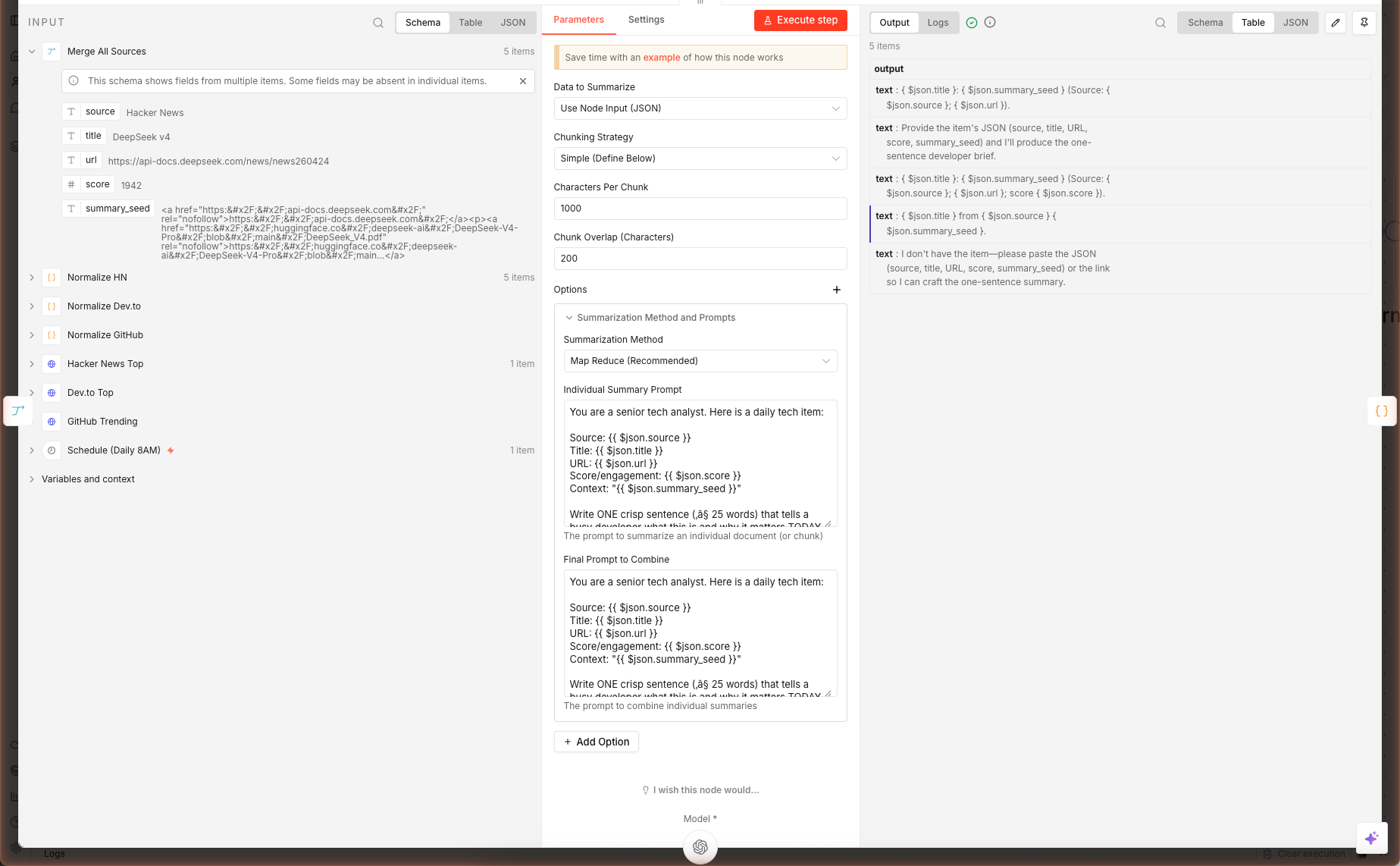 Above: the Summarize Each node opened after a real execution — left panel is the merged input from all three sources, right panel is the gpt-5-mini one-sentence summaries the chain produced.
### Combine Items
A Code node groups the summarized items by source:
```javascript
const bySource = {};
items.forEach(it => {
const src = it.json.source || 'Other';
bySource[src] = bySource[src] || [];
bySource[src].push({
summary: (it.json.output || it.json.response?.text || it.json.text || '').trim(),
url: it.json.url,
title: it.json.title,
score: it.json.score
});
});
```
The triple-fallback `it.json.output || it.json.response?.text || it.json.text` handles three n8n versions' summarization output shapes. Keep it — the cost is one character comparison, the benefit is forward-compatibility.
---
## Step 5 — Slack Block Kit Formatting
Double-click **Format Slack Blocks**. This Code node builds Slack's official [Block Kit](https://api.slack.com/block-kit) payload — a structured JSON that renders into rich cards, not plain text.
```javascript
const blocks = [
{ type: 'header', text: { type: 'plain_text', text: `🧠 Daily Tech Digest — ${date}` } },
{ type: 'context', elements: [{ type: 'mrkdwn', text: `Merged from ${Object.keys(bySource).length} sources` }] },
{ type: 'divider' }
];
Object.entries(bySource).forEach(([src, items]) => {
blocks.push({ type: 'section', text: { type: 'mrkdwn', text: `*${src}*` } });
items.forEach(i => {
const scoreStr = i.score ? ` _(${i.score})_` : '';
blocks.push({ type: 'section', text: { type: 'mrkdwn', text: `• <${i.url}|${i.title}>${scoreStr}\n${i.summary}` } });
});
blocks.push({ type: 'divider' });
});
```
The result: one bolded section header per source, each item on its own line with a clickable title and the AI summary underneath. Scores render in italics `_(312)_`.
> **Why Block Kit vs plain text?** Plain text messages truncate titles at long URLs and don't render as clickable. Block Kit's `` syntax gives you clickable link labels, grouping, dividers, and context footers.
---
## Step 6 — Connect a Slack Webhook
### 6a. Create the Webhook in Slack
1. Open Slack in a browser → click your workspace name top-left → **Settings & administration** → **Manage apps**
2. Search **"Incoming Webhooks"** → **Add to Slack**
3. Choose the channel you want the digest posted to (e.g. `#ai-digest`)
4. Click **Add Incoming WebHooks integration** — Slack gives you a URL like `https://hooks.slack.com/services/T01.../B02.../abc123`
5. Copy that URL
### 6b. Paste Into the Workflow
Double-click **Post to Slack Webhook** in n8n. Replace the placeholder URL:
```
https://hooks.slack.com/services/REPLACE/WITH/YOUR_WEBHOOK
```
…with your real webhook URL. Save the workflow.
### 6c. Test It
Click **Execute workflow** on the canvas. The workflow runs through all 12 nodes and posts to your Slack channel. If everything's right, you get a rich message that looks like a curated newsletter — sources separated, links clickable, AI summaries under each item.
If the Slack message doesn't arrive:
- Open the execution log → click the **Post to Slack Webhook** node → check the HTTP response code. `200` = success. `400` = malformed JSON (usually a missing `text` fallback).
- Verify the channel the webhook was installed into — you can't redirect a webhook without installing a new one.
---
## Extensions: Email, Teams, Discord, Personalize
### Email Instead of Slack
Replace **Post to Slack Webhook** with a **Gmail** node (needs OAuth to your Google account). Map:
- **To** → your email
- **Subject** → `🧠 Daily Tech Digest — {{ $json.text }}`
- **Body (HTML)** → convert the Slack blocks to HTML with a small Code node before this step
### Microsoft Teams
Teams accepts **Adaptive Cards** instead of Block Kit. Create a new Code node that translates the `bySource` object into Adaptive Card JSON ([schema here](https://adaptivecards.io/)). POST to your Teams channel's incoming webhook URL.
### Discord
Discord accepts webhooks but uses a different shape — `embeds` array with `title`, `description`, `url`, `fields`. Simple to translate from `bySource`.
### Personalize With User Preferences
Add a **Read From Database** node before the fetches. Query a table of `{ user_id, topics[], min_score, slack_webhook }` and fan-out per user. Each user gets a digest filtered to their topics with their personal webhook.
### Tune the Sources Per Day
Add a **Switch** node after Schedule that routes to different fetch sets based on weekday. Monday = Hacker News + Dev.to; Friday = GitHub Trending + Product Hunt. Keeps the digest fresh.
---
## What's Next
Combine this with [YouTube → AI Blog Post](https://nerdleveltech.com/guides/n8n-youtube-to-blog) to turn the GitHub repo of the day into a full walkthrough article, or with [AI Lead Enrichment](https://nerdleveltech.com/guides/n8n-ai-lead-enrichment) to identify hiring companies from Dev.to posts and generate outreach.
[^1]: Hacker News Algolia API — [hn.algolia.com/api](https://hn.algolia.com/api)
[^2]: Dev.to Articles API — [developers.forem.com](https://developers.forem.com/api/v1)
[^3]: GitHub Search API — [docs.github.com](https://docs.github.com/en/rest/search/search)
[^4]: Slack Block Kit — [api.slack.com/block-kit](https://api.slack.com/block-kit)
## Frequently Asked Questions
### Why use 3 separate HTTP Request nodes instead of one with variables?
Each source returns a different response shape: HN returns `hits[]` from Algolia, Dev.to returns a plain array, GitHub returns `items[]`. Normalizing three shapes in one Code node is spaghetti. Three Fetch → Normalize pairs give you per-source error handling, per-source retry, and cleaner debugging when one API breaks. The Merge node stitches them back together.
### How do I get the Slack webhook URL?
In Slack, go to your workspace → Apps → search 'Incoming Webhooks' → Add to Slack → pick a channel → Copy the webhook URL. Paste it into the **Post to Slack Webhook** node's URL field, replacing the `REPLACE/WITH/YOUR_WEBHOOK` placeholder. No OAuth scopes, no bot token — just a single URL that accepts POST with Block Kit JSON.
### Can I swap Dev.to for Product Hunt, Medium, or an RSS feed?
Yes. Duplicate the Fetch + Normalize pair for your source and wire the Normalize output into the Merge node. Product Hunt has a GraphQL API (needs free dev key), Medium exposes RSS at `https://medium.com/feed/@` or `/`, and any blog RSS works with n8n's RSS Feed Read node. The only rule: your Normalize node must output `{ source, title, url, score, summary_seed }` — the same shape the other three produce.
### The digest arrives but the AI summaries are missing — why?
Check the Combine Items Code node. It reads from `j.output || j.response?.text || j.text` — these are the three possible output field names depending on your n8n version. If your Summarize Each node uses a different field (common with older versions), open the execution, inspect the summarization output, and update the fallback chain to include that field name.
### What about rate limits? Will GitHub's API ban me?
GitHub's unauthenticated search API allows 10 requests/minute. One workflow run makes exactly 1 request, so daily runs use 1/10 of the minute limit — safe. If you multiply sources (say, 5 different GitHub queries), authenticate by adding `Authorization: Bearer ghp_` in the HTTP node's Headers. That raises the limit to 30/minute. HN and Dev.to have no auth requirement at this volume.
Above: the Summarize Each node opened after a real execution — left panel is the merged input from all three sources, right panel is the gpt-5-mini one-sentence summaries the chain produced.
### Combine Items
A Code node groups the summarized items by source:
```javascript
const bySource = {};
items.forEach(it => {
const src = it.json.source || 'Other';
bySource[src] = bySource[src] || [];
bySource[src].push({
summary: (it.json.output || it.json.response?.text || it.json.text || '').trim(),
url: it.json.url,
title: it.json.title,
score: it.json.score
});
});
```
The triple-fallback `it.json.output || it.json.response?.text || it.json.text` handles three n8n versions' summarization output shapes. Keep it — the cost is one character comparison, the benefit is forward-compatibility.
---
## Step 5 — Slack Block Kit Formatting
Double-click **Format Slack Blocks**. This Code node builds Slack's official [Block Kit](https://api.slack.com/block-kit) payload — a structured JSON that renders into rich cards, not plain text.
```javascript
const blocks = [
{ type: 'header', text: { type: 'plain_text', text: `🧠 Daily Tech Digest — ${date}` } },
{ type: 'context', elements: [{ type: 'mrkdwn', text: `Merged from ${Object.keys(bySource).length} sources` }] },
{ type: 'divider' }
];
Object.entries(bySource).forEach(([src, items]) => {
blocks.push({ type: 'section', text: { type: 'mrkdwn', text: `*${src}*` } });
items.forEach(i => {
const scoreStr = i.score ? ` _(${i.score})_` : '';
blocks.push({ type: 'section', text: { type: 'mrkdwn', text: `• <${i.url}|${i.title}>${scoreStr}\n${i.summary}` } });
});
blocks.push({ type: 'divider' });
});
```
The result: one bolded section header per source, each item on its own line with a clickable title and the AI summary underneath. Scores render in italics `_(312)_`.
> **Why Block Kit vs plain text?** Plain text messages truncate titles at long URLs and don't render as clickable. Block Kit's `` syntax gives you clickable link labels, grouping, dividers, and context footers.
---
## Step 6 — Connect a Slack Webhook
### 6a. Create the Webhook in Slack
1. Open Slack in a browser → click your workspace name top-left → **Settings & administration** → **Manage apps**
2. Search **"Incoming Webhooks"** → **Add to Slack**
3. Choose the channel you want the digest posted to (e.g. `#ai-digest`)
4. Click **Add Incoming WebHooks integration** — Slack gives you a URL like `https://hooks.slack.com/services/T01.../B02.../abc123`
5. Copy that URL
### 6b. Paste Into the Workflow
Double-click **Post to Slack Webhook** in n8n. Replace the placeholder URL:
```
https://hooks.slack.com/services/REPLACE/WITH/YOUR_WEBHOOK
```
…with your real webhook URL. Save the workflow.
### 6c. Test It
Click **Execute workflow** on the canvas. The workflow runs through all 12 nodes and posts to your Slack channel. If everything's right, you get a rich message that looks like a curated newsletter — sources separated, links clickable, AI summaries under each item.
If the Slack message doesn't arrive:
- Open the execution log → click the **Post to Slack Webhook** node → check the HTTP response code. `200` = success. `400` = malformed JSON (usually a missing `text` fallback).
- Verify the channel the webhook was installed into — you can't redirect a webhook without installing a new one.
---
## Extensions: Email, Teams, Discord, Personalize
### Email Instead of Slack
Replace **Post to Slack Webhook** with a **Gmail** node (needs OAuth to your Google account). Map:
- **To** → your email
- **Subject** → `🧠 Daily Tech Digest — {{ $json.text }}`
- **Body (HTML)** → convert the Slack blocks to HTML with a small Code node before this step
### Microsoft Teams
Teams accepts **Adaptive Cards** instead of Block Kit. Create a new Code node that translates the `bySource` object into Adaptive Card JSON ([schema here](https://adaptivecards.io/)). POST to your Teams channel's incoming webhook URL.
### Discord
Discord accepts webhooks but uses a different shape — `embeds` array with `title`, `description`, `url`, `fields`. Simple to translate from `bySource`.
### Personalize With User Preferences
Add a **Read From Database** node before the fetches. Query a table of `{ user_id, topics[], min_score, slack_webhook }` and fan-out per user. Each user gets a digest filtered to their topics with their personal webhook.
### Tune the Sources Per Day
Add a **Switch** node after Schedule that routes to different fetch sets based on weekday. Monday = Hacker News + Dev.to; Friday = GitHub Trending + Product Hunt. Keeps the digest fresh.
---
## What's Next
Combine this with [YouTube → AI Blog Post](https://nerdleveltech.com/guides/n8n-youtube-to-blog) to turn the GitHub repo of the day into a full walkthrough article, or with [AI Lead Enrichment](https://nerdleveltech.com/guides/n8n-ai-lead-enrichment) to identify hiring companies from Dev.to posts and generate outreach.
[^1]: Hacker News Algolia API — [hn.algolia.com/api](https://hn.algolia.com/api)
[^2]: Dev.to Articles API — [developers.forem.com](https://developers.forem.com/api/v1)
[^3]: GitHub Search API — [docs.github.com](https://docs.github.com/en/rest/search/search)
[^4]: Slack Block Kit — [api.slack.com/block-kit](https://api.slack.com/block-kit)
## Frequently Asked Questions
### Why use 3 separate HTTP Request nodes instead of one with variables?
Each source returns a different response shape: HN returns `hits[]` from Algolia, Dev.to returns a plain array, GitHub returns `items[]`. Normalizing three shapes in one Code node is spaghetti. Three Fetch → Normalize pairs give you per-source error handling, per-source retry, and cleaner debugging when one API breaks. The Merge node stitches them back together.
### How do I get the Slack webhook URL?
In Slack, go to your workspace → Apps → search 'Incoming Webhooks' → Add to Slack → pick a channel → Copy the webhook URL. Paste it into the **Post to Slack Webhook** node's URL field, replacing the `REPLACE/WITH/YOUR_WEBHOOK` placeholder. No OAuth scopes, no bot token — just a single URL that accepts POST with Block Kit JSON.
### Can I swap Dev.to for Product Hunt, Medium, or an RSS feed?
Yes. Duplicate the Fetch + Normalize pair for your source and wire the Normalize output into the Merge node. Product Hunt has a GraphQL API (needs free dev key), Medium exposes RSS at `https://medium.com/feed/@` or `/`, and any blog RSS works with n8n's RSS Feed Read node. The only rule: your Normalize node must output `{ source, title, url, score, summary_seed }` — the same shape the other three produce.
### The digest arrives but the AI summaries are missing — why?
Check the Combine Items Code node. It reads from `j.output || j.response?.text || j.text` — these are the three possible output field names depending on your n8n version. If your Summarize Each node uses a different field (common with older versions), open the execution, inspect the summarization output, and update the fallback chain to include that field name.
### What about rate limits? Will GitHub's API ban me?
GitHub's unauthenticated search API allows 10 requests/minute. One workflow run makes exactly 1 request, so daily runs use 1/10 of the minute limit — safe. If you multiply sources (say, 5 different GitHub queries), authenticate by adding `Authorization: Bearer ghp_` in the HTTP node's Headers. That raises the limit to 30/minute. HN and Dev.to have no auth requirement at this volume.