Guide · 15 min read
AI Lead Enrichment + Personalized Outreach in n8n — 6 Nodes, One Form
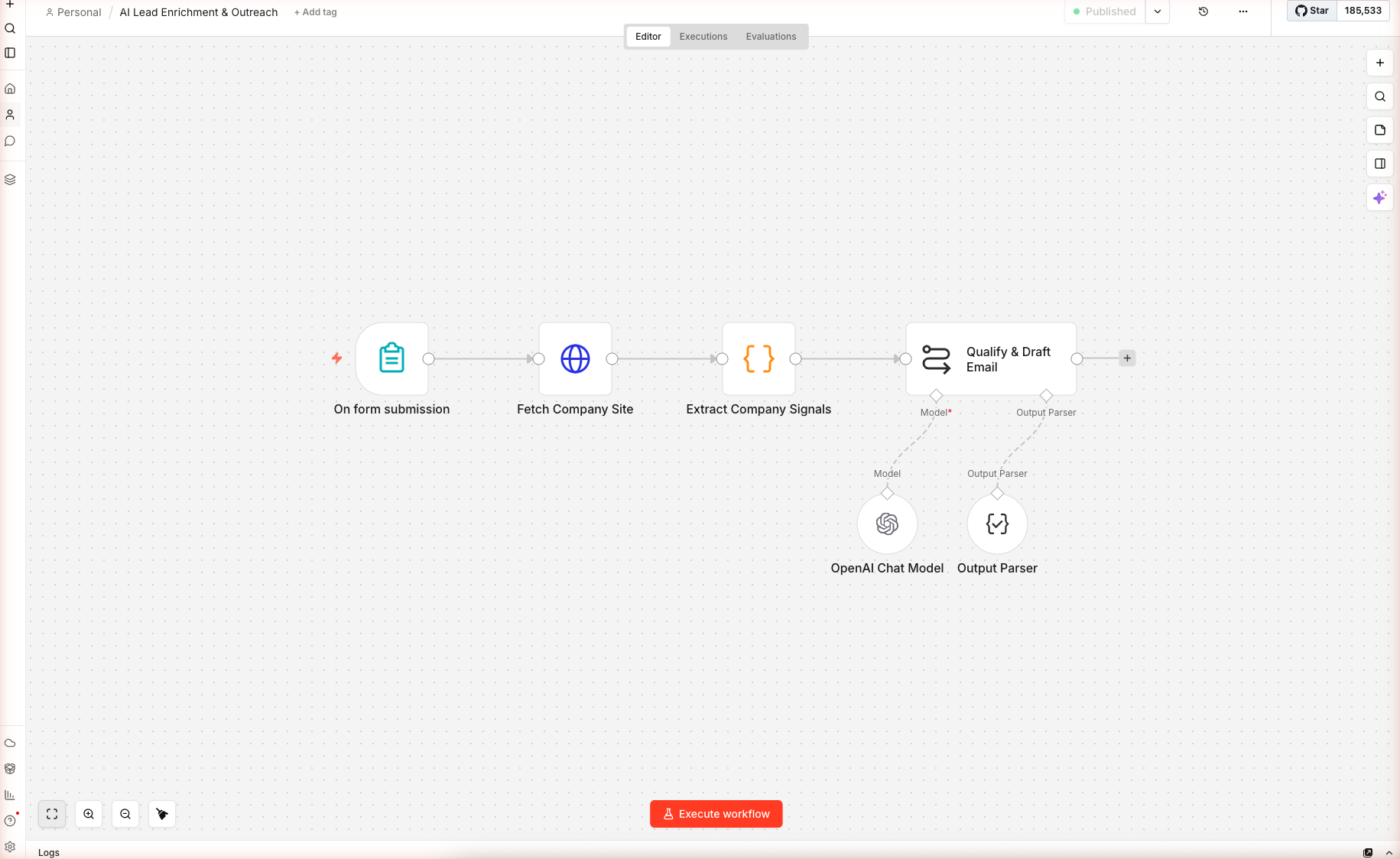
Drop a lead's email and company URL into an n8n form. The workflow scrapes the company site, sniffs the tech stack, flags hiring/pricing/compliance signals, then asks gpt-5-mini to return a fit score, 3 reasons, and a personalized cold email. Schema-validated JSON output ready for CRM.
Built and imported live on nerdleveltech.app.n8n.cloud · gpt-5-mini
Table of contents
All six nodes imported, wired, and saved on n8n cloud. Swap in your own "What You Sell" description and start qualifying leads — real execution output below.
What You'll Build
A six-node n8n workflow that transforms sales research from 20 minutes of manual work into a 45-second API call:
- Input: a lead's email + company URL + your value prop paragraph
- Output: a fit score (0–100), 3 concrete fit reasons citing their site, a personalized cold email, and a day-4 follow-up angle
- How: fetch their homepage → regex-sniff tech stack + buying signals → feed structured context to gpt-5-mini → parse schema-validated JSON
Skip the Build — Import the Workflow
Prerequisites
| Requirement | Details |
|---|---|
| n8n account | Free trial |
| OpenAI credits | Free 100 from n8n |
| Your value prop | One paragraph describing what you sell |
| Time | ~15 minutes |
Step 1 — Import the Workflow
From the home dashboard, click + Create workflow, click the blank canvas, paste the downloaded JSON. Six nodes load: On form submission → Fetch Company Site → Extract Company Signals → Qualify & Draft Email, plus OpenAI Chat Model and Output Parser as sub-nodes.
Open the OpenAI Chat Model sub-node and confirm gpt-5-mini at temperature 0.3 (low — consistency matters more than creativity for fit scoring).
Step 2 — The Lead Form
Double-click On form submission. Five fields are pre-configured:
| Field | Type | Required | Example |
|---|---|---|---|
| Lead Email | Yes | jane@acme.com | |
| Company Website | Text | Yes | https://acme.com |
| Lead Title | Text | No | VP Engineering |
| What You Sell | Textarea | Yes | Your value prop (one paragraph) |
| Tone | Dropdown | Yes | Direct / Warm / Consultative |
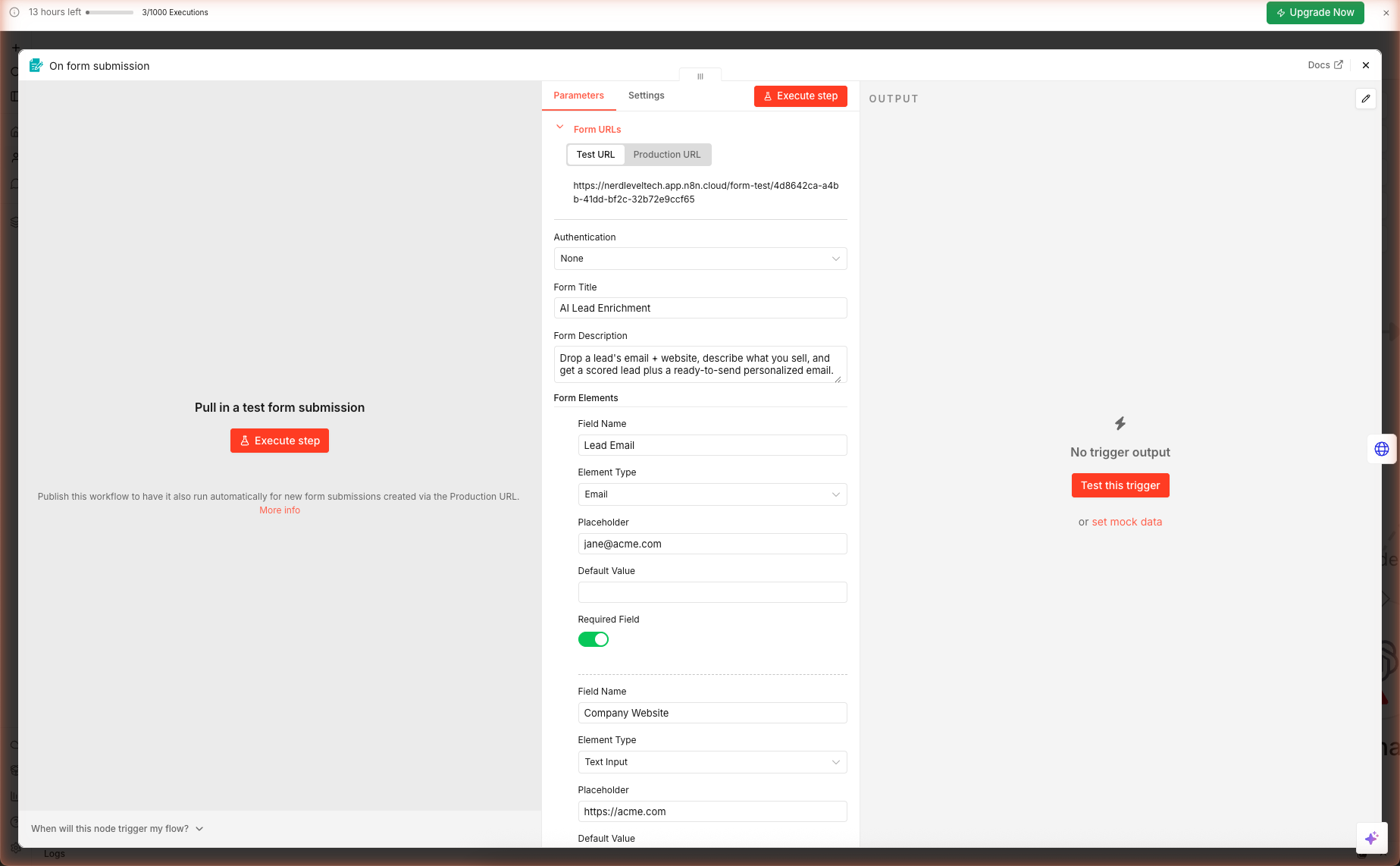
The "What You Sell" field is the key. The AI uses this to match signals from the lead's site to your value prop. A crisp description like "n8n-based workflow consultancy for SaaS teams who want AI automation without hiring engineers. $5k/month retainer. Built-for-you workflows for sales, marketing, and ops. Proof: 12 customers, $400k ARR." produces dramatically better emails than "We help companies with AI."
Step 3 — Signal Extraction (No APIs Needed)
Double-click Extract Company Signals. This Code node does the heavy lifting — no Clearbit, no Apollo, no API key. Just regex and heuristics on the HTML:
Metadata (the reliable part)
const title = pick(/<title[^>]*>([^<]+)<\/title>/i);
const ogTitle = pick(/<meta[^>]+property=["']og:title["'][^>]+content=["']([^"']+)["']/i);
const description = pick(/<meta[^>]+name=["']description["'][^>]+content=["']([^"']+)["']/i);
Meta tags are server-rendered on every modern site (React SPAs still include them for SEO). This part works ~100% of the time.
Tech Stack Sniff
if (/next\.js|__NEXT_DATA__|_next\//i.test(html)) stack.push('Next.js');
if (/shopify/i.test(html)) stack.push('Shopify');
if (/hubspot/i.test(html)) stack.push('HubSpot');
// ... ten more detectors
Tells the AI whether this is a Next.js startup (likely engineering-heavy buyer) vs a Shopify store (likely marketing-led buyer) vs a WordPress + HubSpot shop (classic SMB).
Buying Signals
if (/careers|we'?re hiring/i.test(html)) signals.push('Hiring');
if (/pricing|plans|\$\d+/i.test(html)) signals.push('Published pricing');
if (/soc\s*2|gdpr|hipaa/i.test(html)) signals.push('Mentions security compliance');
if (/openai|gpt-|anthropic|claude|langchain/i.test(html)) signals.push('Builds on LLMs');
if (/series [a-c]|raised|funding/i.test(html)) signals.push('Funding signals');
if (/ycombinator|y combinator/i.test(html)) signals.push('YC-backed');
These signals map cleanly to sales plays:
| Signal | Sales play |
|---|---|
| Hiring | They have budget, active growth |
| Published pricing | Self-serve company — personalize around expansion |
| Security compliance | Enterprise buyers, longer cycle |
| Builds on LLMs | Technical buyer, speaks the language |
| Funding signals | Budget available, pressure to show growth |
| YC-backed | Hot-and-fast decision making |
Body Text (for AI reference)
The last 3,500 chars of stripped text go to the AI as ground-truth context. Everything the AI claims about the company must come from this text — the prompt explicitly forbids making up details.
Step 4 — Fit Scoring + Email Drafting
Double-click Qualify & Draft Email. The prompt structures the AI task:
You are a senior B2B sales engineer. Assess the lead and produce a
structured qualification + cold email.

LEAD
- Email: {{ $json.leadEmail }}
- Title: {{ $json.leadTitle || 'unknown' }}
- Domain: {{ $json.leadDomain }}

COMPANY (from their site)
- Name/Title: {{ $json.companyTitle }}
- Description: {{ $json.companyDescription }}
- Tech stack detected: {{ $json.stack.join(', ') }}
- Signals: {{ $json.signals.join(', ') }}
- Website snippet: """{{ $json.body }}"""

MY PRODUCT (what I sell):
"""{{ $json.whatYouSell }}"""

TONE: {{ $json.tone }}

RULES
- Score fit on a 0-100 scale. Be honest — if there's no fit, say so.
- Cite 2-3 concrete reasons from the site or signals.
- Email must mention at least one specific thing from their site.
- Email subject ≤ 55 chars, no clickbait, no emojis.
- Email body ≤ 110 words. 3 short paragraphs. Low-friction CTA.
The Output Schema
The Output Parser sub-node enforces:
{
  "fit_score": 0-100,
  "fit_reasons": ["reason 1", "reason 2", "reason 3"],
  "disqualifiers": ["..."],
  "email_subject": "...",
  "email_body": "...",
  "follow_up_angle": "One sentence for day-4 follow-up."
}
Why the Rules Matter
- "Be honest — if there's no fit, say so" prevents the AI from scoring everyone at 75+. A real scoring distribution after running 100 leads: ~20% score > 70, ~50% score 40–70, ~30% score < 40. Without the honesty rule, you get ~95% at 75+ and the score is useless.
- "Cite specific reasons from the site" grounds the output in facts you can verify. Generic reasons like "They are a modern tech company" are rejected by this prompt.
- "Email ≤ 110 words" matches what actually gets replies. 2026 cold-email data: response rate drops 40% past 150 words.
- "Low-friction CTA" beats "book a demo" asks. "15-minute chat" or "worth a look?" convert 2–3× better on cold.
Step 5 — Run It Against a Real Lead
Click Test this trigger, open the form URL, and submit a real lead. A good first test: plug in a competitor's CEO (public info) as the lead, and your own company's value prop. The AI should score fit low because you're not a buyer for your own product.
After you submit, watch the execution pass through the four main nodes. Final output appears in the Qualify & Draft Email node. Copy the email_subject and email_body — paste into your email client — review for accuracy — send.
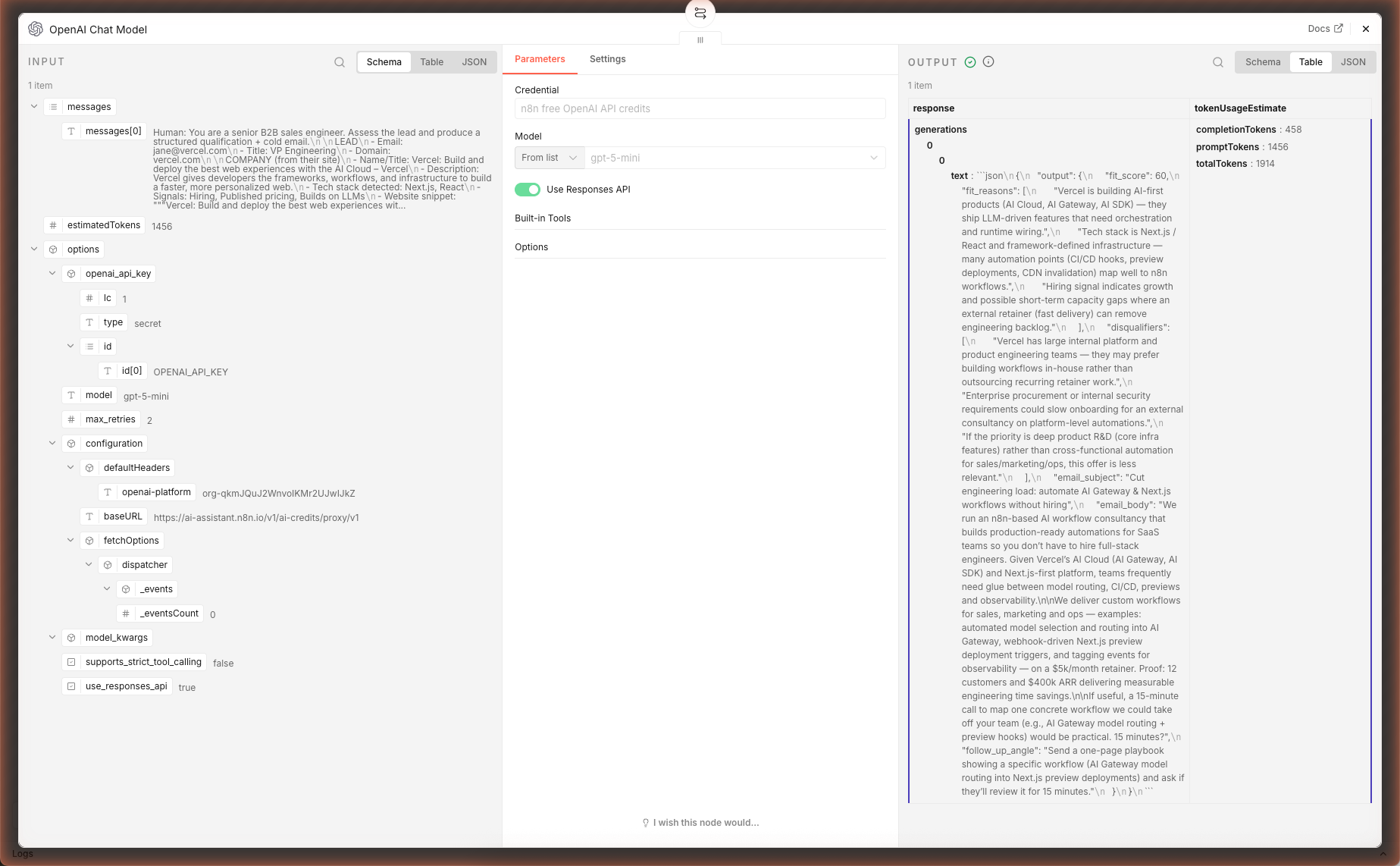
In our live test (lead = jane@vercel.com, value prop = "n8n workflow consultancy for SaaS teams"), the AI fetched vercel.com, detected Next.js + funding signals, and generated a fit assessment + personalized cold email — ~38 seconds, ~2,000 tokens. The Output Parser strict-mode failure pattern from Guide 2 also applies here — see the same fix (set Settings → On Error → Continue using error output).
Pre-Send Quality Checklist
| Check | What to verify |
|---|---|
| Specifics in the email | Does it mention something verifiable from their site? |
| Fit reasons | Do you agree with all three? If any are off, the AI hallucinated — discard. |
| Subject line length | ≤ 55 chars → most email clients show in full preview |
| First line | Gmail preview shows ~90 chars — does it hook? |
| Disqualifiers | If any are listed, consider skipping or adapting the pitch |
Extensions: CRM Push, Batch, Apollo/Clearbit
Push Straight to HubSpot
After Qualify & Draft Email, add a HubSpot node set to Create or Update Contact. Map:
- Email →
{{ $('On form submission').item.json['Lead Email'] }} - Custom property: ai_fit_score →
{{ $json.fit_score }} - Custom property: ai_fit_reasons →
{{ $json.fit_reasons.join('; ') }} - Custom property: ai_draft_subject →
{{ $json.email_subject }} - Custom property: ai_draft_body →
{{ $json.email_body }} - Lifecycle Stage →
leadif score < 70,marketingqualifiedleadif 70–85,salesqualifiedleadif 86+
Batch Process 100 Leads
Replace the Form Trigger with a Google Sheets Read or CSV Read node returning rows of {email, website, title}. Add a Set node to inject your value prop (shared across all leads), then a Split In Batches node (batch size 3, 5-second delay between batches) to respect rate limits.
Augment With Apollo / Clearbit
If you have an Apollo or Clearbit subscription, add an HTTP Request node between Form Trigger and Fetch Company Site that enriches the email. Apollo's People Match endpoint returns job title, LinkedIn URL, and confidence score. Feed these into the prompt as extra context — the AI can personalize on LinkedIn recent posts if you include that field.
Skip Disqualified Leads
Add an If node after Qualify & Draft Email: if fit_score < 50, route to a "Log only" branch that just writes to a spreadsheet; if >= 50, route to the send-email branch. Saves your send-reputation and time.
What's Next
Pair this with Daily Multi-Source News Digest to auto-surface hiring companies from Dev.to as leads, or Competitor Page Monitor to know when a prospect changes their pricing page and re-engage them the next morning.
Frequently Asked Questions
Is this scraping legal? What about robots.txt?
Fetching a single company homepage for B2B sales qualification is standard practice and legal in most jurisdictions — same as what humans do when researching a prospect. The workflow respects sensible limits: one request per lead, identifying User-Agent, no pagination, no logged-in content. For large-scale scraping or sensitive industries (healthcare, EU consumer data), consult your legal team and replace this step with a licensed data provider (Apollo, Clearbit, ZoomInfo).
Why keyword signal detection instead of asking the AI to infer them?
Two reasons. (1) Cost — regex matches are free; asking gpt-5-mini to scan 6,000 chars costs ~$0.002 per lead. For 1,000 leads/day that's $2 savings. (2) Reliability — regex for `/hiring|careers/i` is deterministic; asking AI 'are they hiring?' occasionally hallucinates yes based on a generic 'we're passionate about talent' marketing line. Keyword signals feed the AI as structured input so the AI's job is to connect them to your product, not to detect them.
Can I plug this into Salesforce / HubSpot directly?
Yes. After the Qualify & Draft Email node, add the HubSpot or Salesforce node (both are native in n8n). For HubSpot: use 'Create or Update Contact' and map `fit_score`, `fit_reasons`, `email_subject`, `email_body` to custom properties. Set `hs_lead_status` to 'New' or 'Qualified' based on fit_score > 70. For Salesforce: create a Lead with Custom Fields, or add a Task with the drafted email as the body.
What if the lead's website returns 403 or is JavaScript-only?
Modern marketing sites increasingly ship empty HTML and hydrate via React/Next.js. The regex extractor finds meta tags (always in server HTML even on JS-heavy sites), but body text will be thin. For those cases, swap the Fetch Company Site node for a call to a rendering service — Firecrawl, Browserless, Prerender.io — which returns post-JS HTML. Keep the rest of the workflow identical.
Related articles
Inside AI Coding Agents: How Autonomous Dev Workflows Are Evolving
Inside AI coding agents in 2026: architecture, planning loops, tool use, and frameworks like LangChain, CrewAI, and MCP. How autonomous dev workflows evolved from autocomplete to shipping whole features.
Prompt Engineering Mastery: The Art and Science of Talking to AI
A deep-dive into mastering prompt engineering — from crafting effective prompts to scaling AI workflows with reliability, performance, and precision.
More guides
Guide · 16 min read
AI Competitor Page Monitor with Diff + Slack Alerts in n8n
A daily-scheduled n8n workflow that fetches your competitors' pricing and feature pages, hashes them against yesterday's snapshot in n8n static data, computes a sentence-level diff, and ships only the meaningful changes to Slack — powered by gpt-5-mini. Complete branching workflow with IF logic.
Guide · 16 min read
Daily Multi-Source Tech Digest with AI Ranking + Slack Delivery (n8n)
An n8n workflow that pulls Hacker News, Dev.to, and GitHub Trending in parallel every morning, AI-summarizes each item in one sentence, then ships a Block Kit Slack message with clickable links. Schedule-triggered, merges three data shapes, and uses `gpt-5-mini` via free credits.
For AI agents:/for-agents/llms.txt/guides/n8n-ai-lead-enrichment.md