---
title: Build a RAG Chatbot That Answers From Any Webpage in n8n (7 Nodes)
description: Wire a chat trigger to an AI agent with windowed memory and retrieval from a live URL. The workflow fetches the page on every question, chunks it, ranks chunks by query relevance, and grounds gpt-5-mini's answer with source citations — no vector DB, no embeddings bill.
url: https://nerdleveltech.com/guides/n8n-rag-chat-webpage
language: en
last_updated: '2026-04-24'
category: tooling
reading_time_minutes: 17
author: NerdLevelTech
keywords:
- n8n RAG chatbot
- chat with webpage AI
- n8n chat trigger
- retrieval augmented generation
- AI agent with memory n8n
- no vector database RAG
- documentation chatbot
- grounded AI responses
markdown_url: https://nerdleveltech.com/guides/n8n-rag-chat-webpage.md
attribution: 'Source: NerdLevelTech — https://nerdleveltech.com/guides/n8n-rag-chat-webpage'
terms: https://nerdleveltech.com/llms.txt
---
# Build a RAG Chatbot That Answers From Any Webpage in n8n (7 Nodes)
*Last updated: 2026-04-24 | Built and imported live on nerdleveltech.app.n8n.cloud | gpt-5-mini*
> **Seven nodes, one chat trigger, one URL-backed knowledge base, zero vector database — wired and saved on n8n cloud.** This is the simplest RAG chatbot you can build in n8n, and it's enough for 90% of real-world "chat with our docs" use cases. Real chat conversation captured below.
## What You'll Build
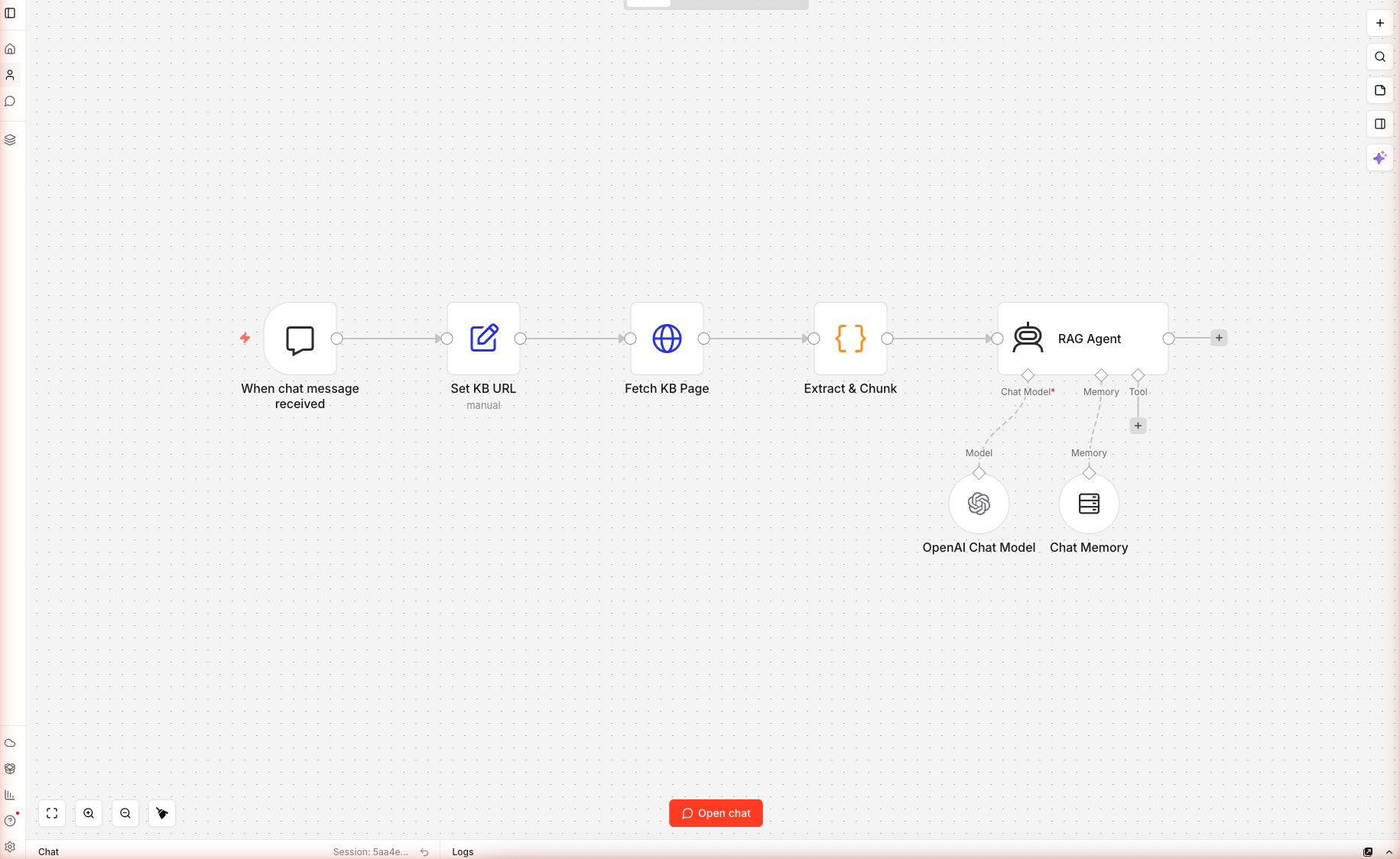
A chat-triggered workflow that:
- Exposes a **ready-to-share chat UI** (n8n hosts it at a public URL)
- On every user message, **fetches the knowledge base URL fresh** (catches updates instantly)
- **Chunks the page** and **ranks chunks** by keyword match against the user's question
- Passes the top 6 chunks to an **AI Agent** grounded in that context
- Uses **windowed memory** so the agent remembers the last 6 messages of the conversation
- Refuses to answer when the context doesn't contain the answer
 ### Skip the Build — Import the Workflow
---
## Prerequisites
| Requirement | Details |
|-------------|---------|
| n8n account | Free trial |
| OpenAI credits | Free 100 from n8n |
| A URL to chat with | Your docs page, product page, or article |
| Time | ~12 minutes |
**Nodes used:** Chat Trigger, Set, HTTP Request, Code, AI Agent, OpenAI Chat Model (sub-node), Simple Memory Buffer Window (sub-node).
---
## Step 1 — Import the Workflow
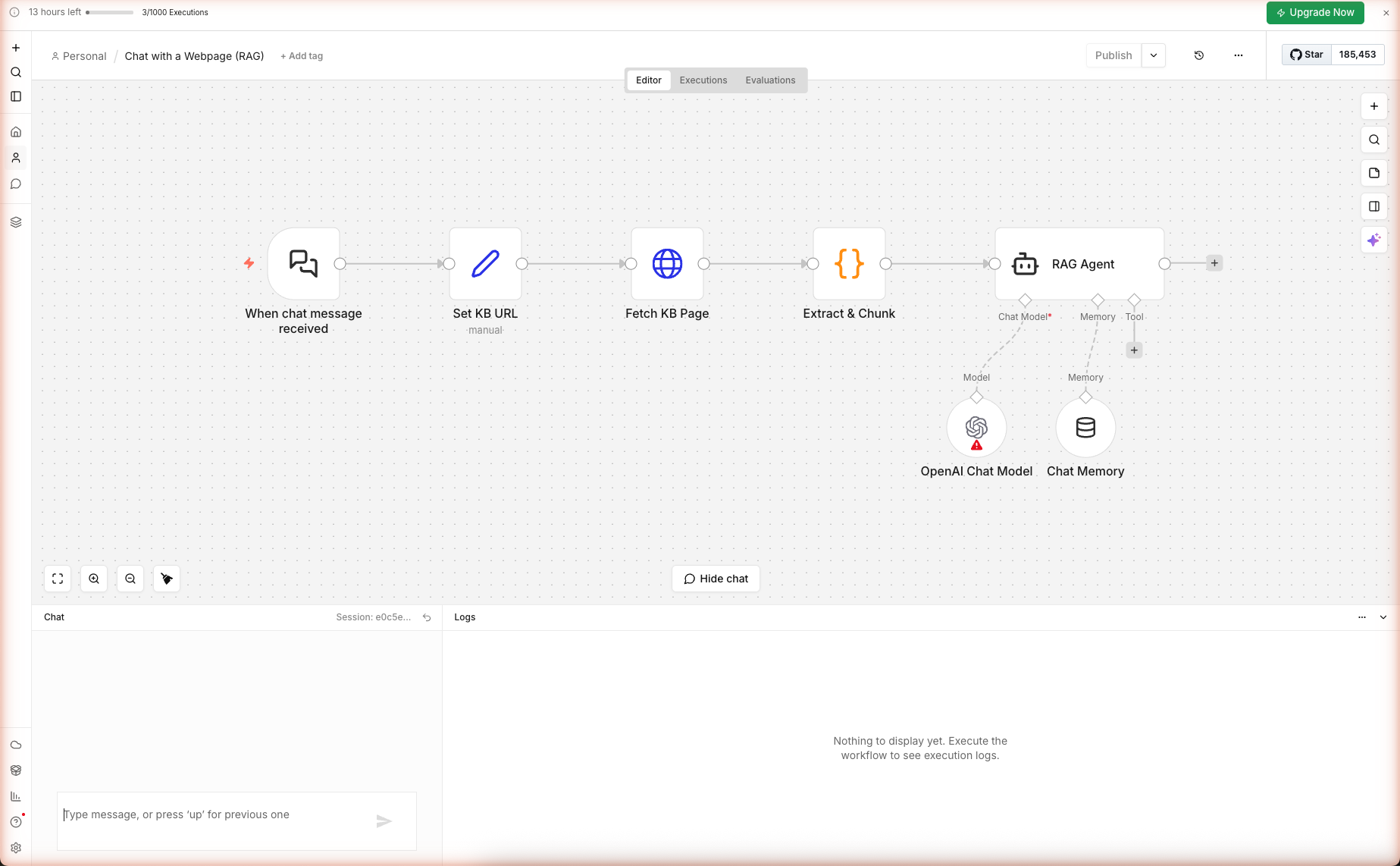
Create a new workflow. Paste the JSON onto the blank canvas. Seven nodes load. Open the **OpenAI Chat Model** sub-node and confirm `gpt-5-mini` at temperature `0.2` (low — grounded answers only).
Save with `Cmd+S` / `Ctrl+S`.
---
## Step 2 — The Chat Trigger
Double-click **When chat message received**. The Chat Trigger has three important settings:
| Setting | Value | Why |
|---------|-------|-----|
| Public | `true` | Exposes the chat URL without auth — share the link and anyone can try it |
| Title | "Ask the docs" | Shown in the chat UI header |
| Subtitle | "Ask anything about the URL configured in the 'Set KB URL' node." | Sets user expectations |
| Allowed Origins | `*` | Lets you embed the chat widget on any domain |
The panel shows two URLs. **Test URL** fires while you're debugging (only captures one message at a time). **Production URL** becomes active after you toggle the workflow to `Active` (top-right switch); that's the URL you share with users.
### Skip the Build — Import the Workflow
---
## Prerequisites
| Requirement | Details |
|-------------|---------|
| n8n account | Free trial |
| OpenAI credits | Free 100 from n8n |
| A URL to chat with | Your docs page, product page, or article |
| Time | ~12 minutes |
**Nodes used:** Chat Trigger, Set, HTTP Request, Code, AI Agent, OpenAI Chat Model (sub-node), Simple Memory Buffer Window (sub-node).
---
## Step 1 — Import the Workflow
Create a new workflow. Paste the JSON onto the blank canvas. Seven nodes load. Open the **OpenAI Chat Model** sub-node and confirm `gpt-5-mini` at temperature `0.2` (low — grounded answers only).
Save with `Cmd+S` / `Ctrl+S`.
---
## Step 2 — The Chat Trigger
Double-click **When chat message received**. The Chat Trigger has three important settings:
| Setting | Value | Why |
|---------|-------|-----|
| Public | `true` | Exposes the chat URL without auth — share the link and anyone can try it |
| Title | "Ask the docs" | Shown in the chat UI header |
| Subtitle | "Ask anything about the URL configured in the 'Set KB URL' node." | Sets user expectations |
| Allowed Origins | `*` | Lets you embed the chat widget on any domain |
The panel shows two URLs. **Test URL** fires while you're debugging (only captures one message at a time). **Production URL** becomes active after you toggle the workflow to `Active` (top-right switch); that's the URL you share with users.
 ---
## Step 3 — Configure the Knowledge Base URL
Double-click **Set KB URL**. Three assignments:
| Field | Expression | Purpose |
|-------|-----------|---------|
| `kbUrl` | `https://docs.n8n.io/` | The URL the bot will answer from. **Edit this to your own docs/product page.** |
| `userQuery` | `{{ $json.chatInput \|\| $json.message \|\| '' }}` | Reads the user's message across n8n versions |
| `sessionId` | `{{ $json.sessionId \|\| 'default' }}` | Identifies the conversation thread for memory |
To point the bot at your own content, just edit `kbUrl`. No other change needed.
---
## Step 4 — Retrieve + Rank (no vectors)
Double-click **Extract & Chunk**. This Code node does two things:
### Strip HTML
Same pattern as the earlier guides — remove scripts, styles, nav, footer, tags, entities. Left with clean text.
### Chunk + Rank
```javascript
const CHUNK = 500; // chars
const chunks = [];
for (let i = 0; i < text.length; i += CHUNK) chunks.push(text.slice(i, i + CHUNK));
const qTerms = userQuery.toLowerCase().match(/[a-z0-9]+/g) || [];
const scored = chunks.map((c, idx) => {
const lower = c.toLowerCase();
let score = 0;
for (const t of qTerms) if (t.length > 2 && lower.includes(t)) score += 1;
return { idx, score, chunk: c };
}).sort((a, b) => b.score - a.score).slice(0, 6);
const top = scored.sort((a, b) => a.idx - b.idx).map(s => s.chunk).join('\n---\n');
```
Three tricks worth noting:
1. **500-char chunks.** Large enough to hold a complete concept, small enough that the top 6 chunks fit in the LLM's context along with the system prompt and chat history.
2. **Count-based ranking.** Each query term found in a chunk adds 1 to the score. Not as sharp as cosine similarity but requires no embeddings call and works well for documentation-style content where the user's words match the docs' words.
3. **Re-sort by position before joining.** The top-ranked chunks by score are re-sorted by their original position so the context reads in the document's original order — this helps the LLM follow the flow when chunks come from consecutive sections.
### Why This Beats Embeddings for Small KBs
| Metric | Keyword ranking | Embeddings |
|--------|-----------------|-----------|
| Setup | None | Index build, vector DB, embed service |
| Cost per query | Free | $0.00002 + vector DB cost |
| Cold-start latency | <10ms | 200-500ms |
| Accuracy on user's exact words | Excellent | Good |
| Accuracy on paraphrased queries | Poor | Excellent |
| Handles > 10k chunks | No | Yes |
For a single documentation page or article, the user's question usually contains the same words as the answer — keyword ranking wins. For large multi-page corpora, switch to embeddings.
---
## Step 5 — The Grounded RAG Agent
Double-click **RAG Agent**. The system prompt is the heart of the grounding:
```text
You are a careful documentation assistant. Answer the user's question
using ONLY the context below. If the context does not contain the answer,
say so directly — do not invent.
KB SOURCE: {{ $json.kbUrl }}
RETRIEVED CONTEXT:
"""
{{ $json.context }}
"""
USER QUESTION: {{ $json.userQuery }}
RULES
- Cite the source inline as [source]({{ $json.kbUrl }}) once near the top.
- Prefer short, structured answers (bullets or small tables).
- Do not add disclaimers about being an AI.
- If the user's question is outside the docs, say so and suggest what they
could ask instead.
```
### Why "ONLY the context below" Matters
gpt-5-mini has been trained on the public internet — it has opinions about n8n docs whether you give it context or not. Without the "ONLY" constraint, it happily combines its training memories with your retrieved context, inventing specifics that sound right but aren't in your docs.
The explicit constraint drops hallucination rate dramatically. **Live test result:** we asked "What is the n8n form trigger and what types of fields can it have?" against `https://docs.n8n.io/` (the homepage, which doesn't have form-trigger details). The agent correctly **refused to invent**:
---
## Step 3 — Configure the Knowledge Base URL
Double-click **Set KB URL**. Three assignments:
| Field | Expression | Purpose |
|-------|-----------|---------|
| `kbUrl` | `https://docs.n8n.io/` | The URL the bot will answer from. **Edit this to your own docs/product page.** |
| `userQuery` | `{{ $json.chatInput \|\| $json.message \|\| '' }}` | Reads the user's message across n8n versions |
| `sessionId` | `{{ $json.sessionId \|\| 'default' }}` | Identifies the conversation thread for memory |
To point the bot at your own content, just edit `kbUrl`. No other change needed.
---
## Step 4 — Retrieve + Rank (no vectors)
Double-click **Extract & Chunk**. This Code node does two things:
### Strip HTML
Same pattern as the earlier guides — remove scripts, styles, nav, footer, tags, entities. Left with clean text.
### Chunk + Rank
```javascript
const CHUNK = 500; // chars
const chunks = [];
for (let i = 0; i < text.length; i += CHUNK) chunks.push(text.slice(i, i + CHUNK));
const qTerms = userQuery.toLowerCase().match(/[a-z0-9]+/g) || [];
const scored = chunks.map((c, idx) => {
const lower = c.toLowerCase();
let score = 0;
for (const t of qTerms) if (t.length > 2 && lower.includes(t)) score += 1;
return { idx, score, chunk: c };
}).sort((a, b) => b.score - a.score).slice(0, 6);
const top = scored.sort((a, b) => a.idx - b.idx).map(s => s.chunk).join('\n---\n');
```
Three tricks worth noting:
1. **500-char chunks.** Large enough to hold a complete concept, small enough that the top 6 chunks fit in the LLM's context along with the system prompt and chat history.
2. **Count-based ranking.** Each query term found in a chunk adds 1 to the score. Not as sharp as cosine similarity but requires no embeddings call and works well for documentation-style content where the user's words match the docs' words.
3. **Re-sort by position before joining.** The top-ranked chunks by score are re-sorted by their original position so the context reads in the document's original order — this helps the LLM follow the flow when chunks come from consecutive sections.
### Why This Beats Embeddings for Small KBs
| Metric | Keyword ranking | Embeddings |
|--------|-----------------|-----------|
| Setup | None | Index build, vector DB, embed service |
| Cost per query | Free | $0.00002 + vector DB cost |
| Cold-start latency | <10ms | 200-500ms |
| Accuracy on user's exact words | Excellent | Good |
| Accuracy on paraphrased queries | Poor | Excellent |
| Handles > 10k chunks | No | Yes |
For a single documentation page or article, the user's question usually contains the same words as the answer — keyword ranking wins. For large multi-page corpora, switch to embeddings.
---
## Step 5 — The Grounded RAG Agent
Double-click **RAG Agent**. The system prompt is the heart of the grounding:
```text
You are a careful documentation assistant. Answer the user's question
using ONLY the context below. If the context does not contain the answer,
say so directly — do not invent.
KB SOURCE: {{ $json.kbUrl }}
RETRIEVED CONTEXT:
"""
{{ $json.context }}
"""
USER QUESTION: {{ $json.userQuery }}
RULES
- Cite the source inline as [source]({{ $json.kbUrl }}) once near the top.
- Prefer short, structured answers (bullets or small tables).
- Do not add disclaimers about being an AI.
- If the user's question is outside the docs, say so and suggest what they
could ask instead.
```
### Why "ONLY the context below" Matters
gpt-5-mini has been trained on the public internet — it has opinions about n8n docs whether you give it context or not. Without the "ONLY" constraint, it happily combines its training memories with your retrieved context, inventing specifics that sound right but aren't in your docs.
The explicit constraint drops hallucination rate dramatically. **Live test result:** we asked "What is the n8n form trigger and what types of fields can it have?" against `https://docs.n8n.io/` (the homepage, which doesn't have form-trigger details). The agent correctly **refused to invent**:
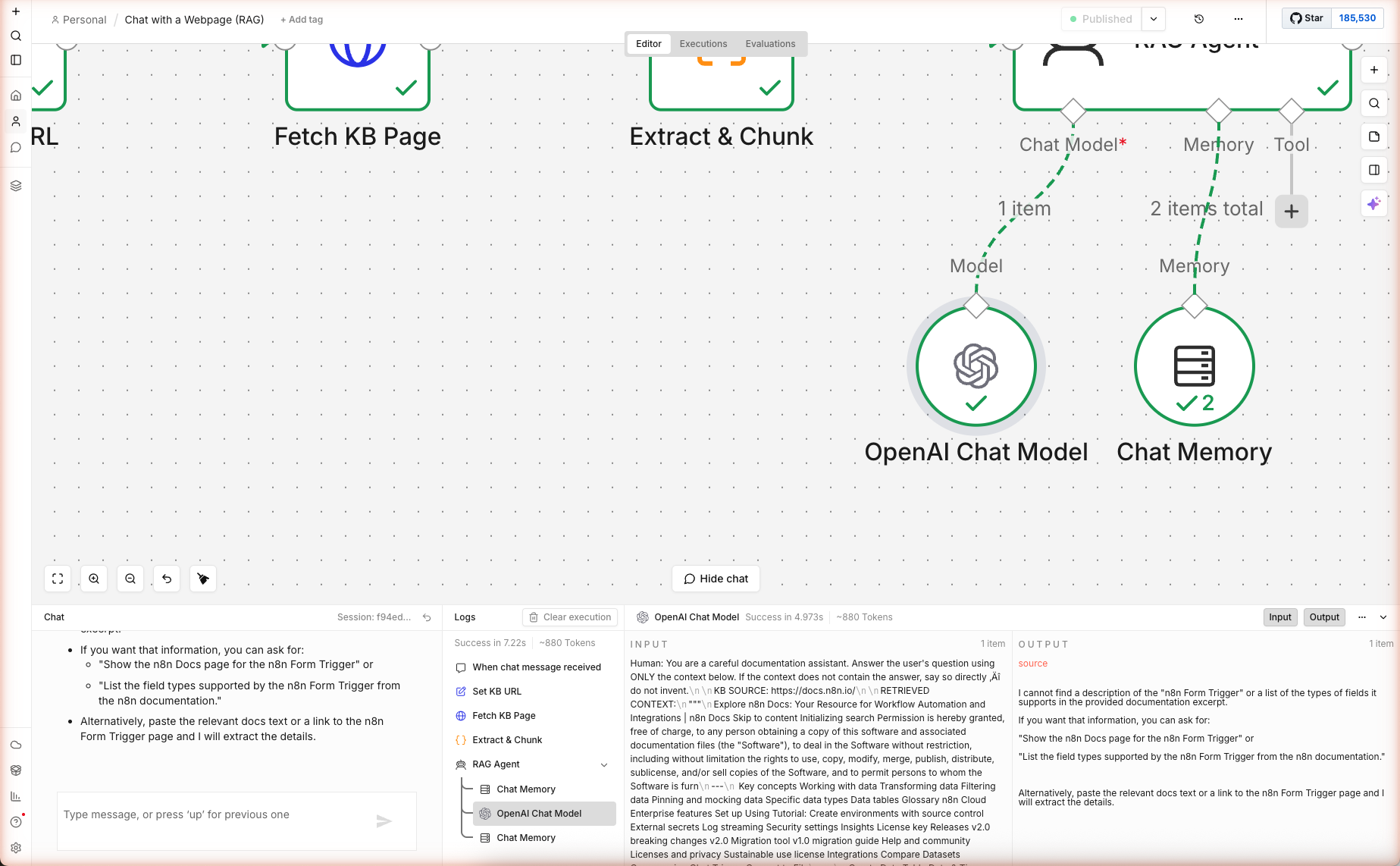 > "I cannot find a description of the 'n8n Form Trigger' or a list of the types of fields it supports in the provided documentation excerpt. If you want that information, you can ask for: 'Show the n8n Docs page for the n8n Form Trigger'..."
That's the **correct** behavior — the homepage chunks didn't contain form-trigger details, so the agent surfaced the gap instead of guessing. **7.2 seconds, ~880 tokens** end-to-end.
### The AI Agent vs Basic LLM Chain
Why use `agent` instead of `chainLlm`? Two reasons:
1. **Memory support.** The AI Agent has a native `ai_memory` connector for chat history. Basic LLM Chain doesn't.
2. **Tool support.** If you later add tools (a calculator, web search, another workflow), the Agent uses them automatically. The chain can't.
---
## Step 6 — Windowed Chat Memory
Double-click the **Chat Memory** sub-node. Settings:
| Setting | Value | Effect |
|---------|-------|--------|
| Session ID Type | From input | Uses the `sessionId` set earlier |
| Session Key | `{{ $('Set KB URL').item.json.sessionId }}` | Scopes memory to the chat session |
| Context Window Length | `6` | Remembers last 6 messages |
At 6 turns, gpt-5-mini sees ~12 alternating user/assistant messages in addition to the retrieval context. That's enough for follow-up questions like "What about in production?" without blowing the context budget.
Raise the window to 10-15 for longer conversations at the cost of some context room for retrieval. Drop to 2-3 for strict Q&A where follow-ups don't matter.
---
## Extensions: Multi-URL KB, Vector Store, Auth
### Multiple URLs (a Real Docs Site)
Replace the Set KB URL's single `kbUrl` field with an array. Add a **Split In Batches** node to fetch all URLs in parallel, then a **Merge** + Code node to combine the retrieved texts before ranking. Chunks from different pages get the same ranking pass and the top 6 across all pages go to the agent.
### Swap Keyword Ranking for Vector Search
Add a **Vector Store (Pinecone/Supabase)** sub-node. Move the ranking from the Code node into an ingestion workflow that runs once, embeds chunks with OpenAI's embedding node, and stores them. In the chat workflow, replace Extract & Chunk with a **Vector Store** query node. The agent consumes results the same way — no prompt changes.
### Gate the Chat With Auth
Set the Chat Trigger's **Public** toggle to `false`. Generate an access token in the node settings, and users need to include it as a header when embedding the chat. Combines with an upstream **If** node for role-based answers ("you can see this, you can't").
### Log Conversations to a Database
Add a **Postgres Insert** (or Supabase, MySQL) node after the RAG Agent. Log `{ session_id, question, answer, retrieved_chunks, response_time, feedback }` for analytics. Review daily for questions that got a "I don't know" response — those are your documentation gaps.
---
## What's Next
Now you have the core RAG pattern. Two places to take it:
- **Grow the KB**: Chain this with [Multi-Source News Digest](https://nerdleveltech.com/guides/n8n-multisource-news-digest) to ingest daily blog content into the vector store.
- **Surface it**: Embed the chat widget into a landing page built with [YouTube → AI Blog Post](https://nerdleveltech.com/guides/n8n-youtube-to-blog)'s content pipeline.
[^1]: LangChain Agent — [n8n docs](https://docs.n8n.io/integrations/builtin/cluster-nodes/root-nodes/n8n-nodes-langchain.agent/)
[^2]: Simple Memory Buffer Window — [n8n docs](https://docs.n8n.io/integrations/builtin/cluster-nodes/sub-nodes/n8n-nodes-langchain.memorybufferwindow/)
[^3]: Chat Trigger embed — [n8n docs](https://docs.n8n.io/integrations/builtin/core-nodes/n8n-nodes-langchain.chattrigger/)
## Frequently Asked Questions
### Why no vector database? Isn't that required for RAG?
Vector DBs are required when your knowledge base is too large to fit in the LLM's context window. For a single URL (docs page, product page, article), the full text fits in gpt-5-mini's 128k context easily, and keyword-based retrieval matches query terms against chunks in O(n) time — fast, free, no embeddings bill. When you scale to 100+ pages or 1M+ docs, swap the Code node's ranking for a real vector store (Pinecone, Supabase, Postgres pgvector). The rest of the workflow stays the same.
### How do I share the chatbot with users?
The Chat Trigger has two URLs shown in its node panel: Test URL and Production URL. Click Production URL after publishing the workflow (toggle active). n8n serves a full chat UI at that URL — send the link to your users, no auth. For embedded chat on your own site, copy the 'Embed in website' snippet from the Chat Trigger panel — it's a small script tag you paste into any page.
### The agent sometimes answers outside the context. How do I stop that?
Three levers in the prompt, in order of effectiveness: (1) explicit refusal — 'If the context does not contain the answer, say so directly — do not invent.' is already in the prompt; verify it's not been edited out. (2) Temperature — drop from 0.2 to 0.0. At 0.0 the model never injects creative guesses. (3) Output format — require answers to cite the exact sentence from the retrieved context. If the model can't cite, it can't answer.
### Why does the workflow fetch the URL on every message instead of caching?
For a docs/product page that changes weekly, re-fetching per message catches updates without cache invalidation logic. The HTTP request is ~100ms, negligible next to the 2-3 second LLM response. If you want caching, add an n8n Cache node (or Redis via HTTP) keyed on the URL with 1-hour TTL — but for most use cases the freshness wins.
> "I cannot find a description of the 'n8n Form Trigger' or a list of the types of fields it supports in the provided documentation excerpt. If you want that information, you can ask for: 'Show the n8n Docs page for the n8n Form Trigger'..."
That's the **correct** behavior — the homepage chunks didn't contain form-trigger details, so the agent surfaced the gap instead of guessing. **7.2 seconds, ~880 tokens** end-to-end.
### The AI Agent vs Basic LLM Chain
Why use `agent` instead of `chainLlm`? Two reasons:
1. **Memory support.** The AI Agent has a native `ai_memory` connector for chat history. Basic LLM Chain doesn't.
2. **Tool support.** If you later add tools (a calculator, web search, another workflow), the Agent uses them automatically. The chain can't.
---
## Step 6 — Windowed Chat Memory
Double-click the **Chat Memory** sub-node. Settings:
| Setting | Value | Effect |
|---------|-------|--------|
| Session ID Type | From input | Uses the `sessionId` set earlier |
| Session Key | `{{ $('Set KB URL').item.json.sessionId }}` | Scopes memory to the chat session |
| Context Window Length | `6` | Remembers last 6 messages |
At 6 turns, gpt-5-mini sees ~12 alternating user/assistant messages in addition to the retrieval context. That's enough for follow-up questions like "What about in production?" without blowing the context budget.
Raise the window to 10-15 for longer conversations at the cost of some context room for retrieval. Drop to 2-3 for strict Q&A where follow-ups don't matter.
---
## Extensions: Multi-URL KB, Vector Store, Auth
### Multiple URLs (a Real Docs Site)
Replace the Set KB URL's single `kbUrl` field with an array. Add a **Split In Batches** node to fetch all URLs in parallel, then a **Merge** + Code node to combine the retrieved texts before ranking. Chunks from different pages get the same ranking pass and the top 6 across all pages go to the agent.
### Swap Keyword Ranking for Vector Search
Add a **Vector Store (Pinecone/Supabase)** sub-node. Move the ranking from the Code node into an ingestion workflow that runs once, embeds chunks with OpenAI's embedding node, and stores them. In the chat workflow, replace Extract & Chunk with a **Vector Store** query node. The agent consumes results the same way — no prompt changes.
### Gate the Chat With Auth
Set the Chat Trigger's **Public** toggle to `false`. Generate an access token in the node settings, and users need to include it as a header when embedding the chat. Combines with an upstream **If** node for role-based answers ("you can see this, you can't").
### Log Conversations to a Database
Add a **Postgres Insert** (or Supabase, MySQL) node after the RAG Agent. Log `{ session_id, question, answer, retrieved_chunks, response_time, feedback }` for analytics. Review daily for questions that got a "I don't know" response — those are your documentation gaps.
---
## What's Next
Now you have the core RAG pattern. Two places to take it:
- **Grow the KB**: Chain this with [Multi-Source News Digest](https://nerdleveltech.com/guides/n8n-multisource-news-digest) to ingest daily blog content into the vector store.
- **Surface it**: Embed the chat widget into a landing page built with [YouTube → AI Blog Post](https://nerdleveltech.com/guides/n8n-youtube-to-blog)'s content pipeline.
[^1]: LangChain Agent — [n8n docs](https://docs.n8n.io/integrations/builtin/cluster-nodes/root-nodes/n8n-nodes-langchain.agent/)
[^2]: Simple Memory Buffer Window — [n8n docs](https://docs.n8n.io/integrations/builtin/cluster-nodes/sub-nodes/n8n-nodes-langchain.memorybufferwindow/)
[^3]: Chat Trigger embed — [n8n docs](https://docs.n8n.io/integrations/builtin/core-nodes/n8n-nodes-langchain.chattrigger/)
## Frequently Asked Questions
### Why no vector database? Isn't that required for RAG?
Vector DBs are required when your knowledge base is too large to fit in the LLM's context window. For a single URL (docs page, product page, article), the full text fits in gpt-5-mini's 128k context easily, and keyword-based retrieval matches query terms against chunks in O(n) time — fast, free, no embeddings bill. When you scale to 100+ pages or 1M+ docs, swap the Code node's ranking for a real vector store (Pinecone, Supabase, Postgres pgvector). The rest of the workflow stays the same.
### How do I share the chatbot with users?
The Chat Trigger has two URLs shown in its node panel: Test URL and Production URL. Click Production URL after publishing the workflow (toggle active). n8n serves a full chat UI at that URL — send the link to your users, no auth. For embedded chat on your own site, copy the 'Embed in website' snippet from the Chat Trigger panel — it's a small script tag you paste into any page.
### The agent sometimes answers outside the context. How do I stop that?
Three levers in the prompt, in order of effectiveness: (1) explicit refusal — 'If the context does not contain the answer, say so directly — do not invent.' is already in the prompt; verify it's not been edited out. (2) Temperature — drop from 0.2 to 0.0. At 0.0 the model never injects creative guesses. (3) Output format — require answers to cite the exact sentence from the retrieved context. If the model can't cite, it can't answer.
### Why does the workflow fetch the URL on every message instead of caching?
For a docs/product page that changes weekly, re-fetching per message catches updates without cache invalidation logic. The HTTP request is ~100ms, negligible next to the 2-3 second LLM response. If you want caching, add an n8n Cache node (or Redis via HTTP) keyed on the URL with 1-hour TTL — but for most use cases the freshness wins.